Fill Out Your Bmo Deposit Form
The BMO electronic Business Account Deposit Slip serves as a crucial document for customers making deposits through bank branches and ATMs. Proper completion of the deposit slip ensures that funds are accurately processed and credited to the appropriate account. Several key components must be filled out, including the account holder's name, the date of the transaction, and the transit and account numbers. Without all mandatory fields completed, there is a risk that the deposit may not be processed. For those utilizing the Around the Clock Deposit service, strict adherence to these requirements is essential; specifically, the form must be printed and trimmed to the specified size prior to deposit. Additionally, the slip requires detailed information regarding each cheque being deposited, including the cheque identification and corresponding amounts. It is also necessary to account for any cash or coins included in the deposit, with the total calculated automatically by the form. After filling out the slip, individuals must print two copies—one for their records and one for submission—and remember to initial both copies in the designated area. These steps collectively help streamline the deposit process and minimize the chances of errors.
Bmo Deposit Example

BMO electronic Business Account Deposit Slip is for deposits made at branches and ATMs. Incomplete deposit slips can result in deposits not being processed.
IMPORTANT:
If this deposit slip is used for Around the Clock Deposit service:
•It must contain the Name of Account, Date, and Transit and Account Number and be completed, as indicated below.
•Once completed and printed, the deposit slip must be cut to the size indicated on the form, before depositing in the Around the Clock Depository.
How to complete your electronic Business Account Deposit Slip:
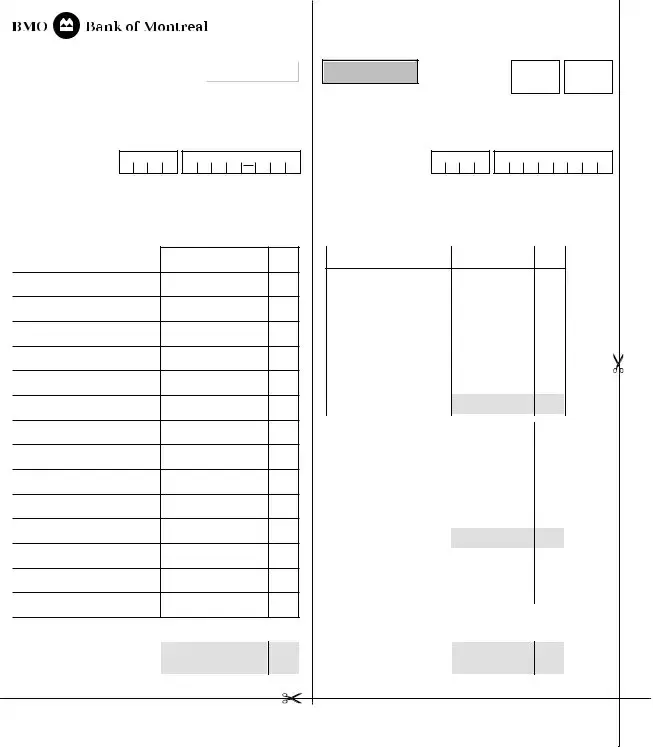
1.Complete ALL mandatory fields on the top left and right sides of Deposit Slip:
•Name of Account
•Date
•Transit and Account Number
2.On the left side of the Deposit Slip, complete:
•The Cheque Identification (i.e. Name on Cheque and/or Cheque Number) with corresponding dollar amount
•Enter the total number of cheques listed on the deposit slip in the “# of Cheques field”
3.On the right side of the Deposit Slip, add the total amount of Cash, Coins, and MasterCard as it appears in the deposit
Note: The form will automatically calculate Subtotal and Total fields.
4.Print copies of the completed Deposit Slip, one for your records and one
to be submitted with the deposit. Initial both copies of the Deposit Slip in the Depositor’s box located at the top right corner.
163104 (01/16) 21/04/2016 4:29 pm
BUSINESS ACCOUNT DEPOSIT SLIP
|
|
Reset form |
NAME OF |
|
|
ACCOUNT |
|
|
DATE |
TRANSIT NO. ACCOUNT NO. |
|
Print Form
CREDIT
DATE
INITIALS
DEPOSITOR’S
TRANSIT NO. ACCOUNT NO.
TELLER’S
DD MMM YYYY
DD / MMM / YYYY
LIST OF CHEQUES
PLEASE LIST FOREIGN CHEQUES ON SEPARATE DEPOSIT SLIP
CHEQUE IDENTIFICATION |
AMOUNT |
1
2
3
4
5
6
7
8
9
10
11
12
13
14
15
# OF CHEQUES |
TOTAL |
$ |
0.00 |
0 |
DEPOSITED |
||
|
CHEQUES |
|
163104 (01/16) 21/04/2016 4:29 pm
DD MMM YYYY
DD / MMM / YYYY
CASH COUNT |
AMOUNT |
|
|
X 5 |
0.00 |
|
|
|
X 10 |
|
0.00 |
|
|
|
|
|
|
|
|
|
X 20 |
|
0.00 |
|
|
|
X 50 |
|
0.00 |
|
|
|
X 100 |
|
0.00 |
|
|
|
X |
|
0.00 |
|
|
|
X |
|
0.00 |
|
TOTAL CASH |
|
$ |
0.00 |
|
|
(NOTES) DEPOSITED |
||||
|
|
|
|
|
|
|
|
|
X $1 COIN |
|
0.00 |
|
|
|
X $2 COIN |
|
0.00 |
|
|
|
X |
|
0.00 |
|
|
|
X |
|
0.00 |
|
|
|
Loose Coin |
|
|
|
|
|
|
|
|
|
DEPOSITED |
|
$ |
0.00 |
|
|
TOTAL COIN |
|
|
|
|
|
MASTERCARD |
|
$ |
|
|
|
|
|
|
|
|
|
# OF |
|
TOTAL |
|
0.00 |
|
CHEQUES |
|
CHEQUES |
$ |
|
|
0 |
|
DEPOSITED |
|
|
|
|
|
|
|
|
|
TOTAL |
|
$ |
0.00 |
|
|
CHEQUES |
|
|||
|
DEPOSITED |
|
|
|
|
|
1 - Branch Copy |
|
2 - Customer Copy |
||
Form Characteristics
| Fact Name | Description |
|---|---|
| Purpose | The BMO Deposit form is specifically designed for electronic Business Account deposits at branches and ATMs. |
| Completeness Requirement | Failure to complete the deposit slip can lead to the deposit not being processed. Ensure all mandatory fields are filled out. |
| Mandatory Information | Important details include the Name of Account, Date, Transit Number, and Account Number. |
| Around the Clock Depository | If using the deposit slip for Around the Clock service, cut it to the specified size before submission. |
| Cheque Identification | Provide the Cheque Identification on the left side, indicating the name on the cheque and amount for each. |
| Printing Copies | After completion, print two copies: one for your records and one to submit with the deposit. |
| Subtotal Calculation | The deposit slip automatically calculates subtotal and total fields when cash and cheques are entered. |
Guidelines on Utilizing Bmo Deposit
Filling out the BMO Deposit form accurately ensures your deposits are processed without delay. Follow these steps carefully to complete the form correctly. Be mindful of all required information before submitting.
- Complete all mandatory fields on the top left and right sides of the Deposit Slip:
- Name of Account
- Date
- Transit and Account Number
- On the left side of the Deposit Slip, enter:
- The Cheque Identification (Name on Cheque and/or Cheque Number) with corresponding dollar amount.
- The total number of cheques in the “# of Cheques” field.
- On the right side of the Deposit Slip, add the total amount of Cash, Coins, and MasterCard as it appears in the deposit. The form will automatically calculate the Subtotal and Total fields.
- Print copies of the completed Deposit Slip: one for your records and one to submit with the deposit. Initial both copies in the Depositor’s box located at the top right corner.
What You Should Know About This Form
What is the BMO electronic Business Account Deposit Slip used for?
The BMO electronic Business Account Deposit Slip is specifically designed for depositing funds at BMO branches and ATMs. It serves as an essential tool to ensure that your deposits are processed accurately and efficiently. Using the correct deposit slip helps to minimize the risk of errors during the deposit process.
What information must be included on the deposit slip?
To ensure that your deposit is processed, it is crucial to complete all mandatory fields on both the left and right sides of the Deposit Slip. This includes the Name of Account, Date, Transit Number, and Account Number. Additionally, you must list each cheque with its identification and corresponding dollar amount on the left side and calculate the total amount of cash, coins, and MasterCard deposits on the right side.
What happens if incomplete deposit slips are submitted?
Submitting an incomplete deposit slip can lead to processing delays or even result in the deposit not being processed at all. To avoid this issue, double-check that all necessary fields are filled out completely before submitting your deposit slip, ensuring that no essential information is left out.
How do I use the deposit slip for Around the Clock Deposit service?
When utilizing the Around the Clock Deposit service, it is important that your deposit slip contains the Name of Account, Date, Transit Number, and Account Number. Make sure to complete the slip according to the provided guidelines. After printing, cut the deposit slip to the indicated size before proceeding with your deposit in the designated depository.
What should I do after completing the deposit slip?
Once you have fully completed the deposit slip, print two copies—one for your records and one to accompany the deposit. Remember to initial both copies in the Depositor’s box located at the top right corner of the form. Keeping one copy ensures you have a reference in case any issues arise with the deposit.
Common mistakes
Completing the BMO Deposit form may seem straightforward, but several common mistakes can lead to complications. It’s crucial for individuals to be alert to these errors to ensure a smooth transaction. One frequent mistake is leaving mandatory fields blank. The deposit slip requires essential information—such as the Name of Account, Date, and Transit and Account Number. Omitting any of these details can result in a refused deposit.
Another common pitfall is failing to correctly complete the cheque identification section. Users should include the Name on Cheque and Cheque Number along with the corresponding dollar amount. This oversight can prevent the bank from properly processing each cheque, potentially delaying funds availability.
Additionally, some individuals forget to total their deposits accurately. On the right side of the slip, not completing the total amount of Cash, Coins, and MasterCard transactions can lead to confusion. Users often assume the deposit form will auto-calculate correctly without reviewing their entries. Reviewing the totals is essential for accuracy.
Many also neglect the “# of Cheques” field, which should accurately reflect the number of cheques being submitted. An incorrect count can cause discrepancies, leading to potential delays or complications during processing.
When printing the deposit slip, users may fail to trim it to the specified size. This mistake can render the slip unusable in the Around the Clock Depository, as it must match the dimensions indicated on the form. Properly cutting the slip ensures it fits into deposit boxes without issues.
Another error that frequently occurs is forgetting to initial both copies of the deposit slip. Initialing serves as a form of verification and helps the bank confirm that the deposit slip was completed by the depositor. This important step is often overlooked, leading to potential questions about the authenticity of the deposit.
Some users also do not keep a copy for their records. Maintaining a completed deposit slip ensures that individuals have proof of the submitted transactions. Without this record, tracking funds or resolving discrepancies can become more challenging.
Cheques may be mistakenly deposited without checking if they are foreign. Including foreign cheques on the same deposit slip as domestic ones can complicate processing. It is essential to list foreign cheques separately to avoid rejection of the entire deposit.
Lastly, many users underestimate the importance of reviewing for legibility. Handwriting should be clear and legible to prevent misunderstandings. Illegible forms can lead to processing errors, so neat and clear writing is vital.
Avoiding these common mistakes when filling out the BMO Deposit form can save time and hassle. Taking care to ensure every detail is correct and complete will facilitate a smoother banking experience and help with faster access to funds.
Documents used along the form
When utilizing the BMO Deposit form for your business account, it's essential to have the right documents and forms in place to ensure a smooth transaction. Several forms often accompany this deposit slip, serving specific purposes that enhance the accuracy and reliability of the deposit process. Understanding these documents can help you complete your banking tasks efficiently and confidently.
- Branch Copy: This is the copy that the bank retains for their records. Once the deposit is processed, it serves as confirmation that the transaction took place and provides a reference to the exact amount deposited.
- Customer Copy: This is the deposit slip returned to you after processing. It acts as your receipt, proving that you made a deposit. Keeping this copy can be helpful for your personal records or for reconciliation purposes later.
- Cheque Image Receipt: If you're depositing checks, your bank may provide an electronic image of each check that was deposited. This document can be invaluable for tracking and verifying deposits over time.
- Deposit Summary Report: Some banks offer a summary report detailing all deposits made during a specific period. This can be useful for accounting and monitoring cash flow.
- Transaction Notification: After a deposit is made, you might receive a notification through email or text. This serves as an immediate alert that your deposit was successful, providing peace of mind.
- Deposit Authorization Form: In certain circumstances, especially for larger transactions or when sending deposits through a third party, you might need to complete an authorization form. This grants permission to the bank to process your deposit on your behalf.
By familiarizing yourself with these documents, you empower yourself to manage your deposit activity with confidence. Precise documentation not only aids your business accounting but also strengthens your relationship with your bank. Always keep your records organized and up-to-date for any future needs.
Similar forms
-
Bank Deposit Slip: Similar to the BMO Deposit form, a standard bank deposit slip is used to facilitate cash and cheque deposits. It requires the account holder's name, account number, and relevant transaction details. Like the BMO form, it often mandates completion of specific information to ensure processing.
-
ATM Deposit Envelope: When making deposits via an ATM, users typically utilize a deposit envelope that requires similar information, such as account details and the amount being deposited. Like the BMO form, it is essential for correct processing and may require cutting to a specified size.
-
Wire Transfer Request Form: This document allows account holders to authorize the transfer of funds between accounts. It shares similarities with the BMO Deposit form in that details such as the account name, receiver information, and amounts are necessary for execution. Accuracy is crucial for successful transactions.
-
Check Deposit Form: This specific form is used for depositing checks either at a bank branch or through an ATM. Like the BMO Deposit form, it requires the identification of the payer, check amount, and account number to ensure proper processing.
-
Cash Deposit Form: Banks often provide a dedicated form for cash deposits. This requires similar information, including account information and cash amounts, and aims to prevent discrepancies during transactions, similar to the BMO Deposit process.
-
Deposit Receipt: Upon completing a deposit transaction, a deposit receipt is generated, confirming the successful deposit of funds. It relates closely to the BMO Deposit Slip as it summarizes the transaction, verifying the amounts and types of items deposited.
-
Electronic Funds Transfer (EFT) Authorization Form: This form is used for setting up regular transfers between accounts. While it has a broader purpose than the BMO Deposit Slip, both require detailed account information to ensure permissions and accuracy in transactions.
Dos and Don'ts
When filling out the BMO Deposit form, it's essential to follow specific guidelines to ensure your deposit is processed correctly. Here are ten important steps to follow and avoid:
- Do complete all mandatory fields on the top left and right sides of the deposit slip.
- Do ensure the Name of Account, Date, and Transit and Account Number are accurate.
- Do provide the Cheque Identification, including the Name on Cheque and Cheque Number.
- Do enter the total number of cheques in the "# of Cheques" field.
- Do add the total amounts for Cash, Coins, and MasterCard correctly.
- Do print two copies of the completed deposit slip: one for your records and one to submit.
- Do initial both copies of the deposit slip in the Depositor’s box at the top right corner.
- Don't leave any mandatory fields blank; incomplete slips can cause delays.
- Don't forget to cut the deposit slip to the correct size before use in the Around the Clock Depository.
- Don't use the same deposit slip for foreign cheques; they must be listed on a separate deposit slip.
Misconceptions
- Misconception 1: Users can leave fields blank on the deposit slip.
- Misconception 2: The deposit slip can be submitted without being printed.
- Misconception 3: Only cash deposits require a completed slip.
- Misconception 4: Only the total cash amount needs to be reported.
- Misconception 5: Foreign cheques can be included on the same deposit slip.
- Misconception 6: What is printed on the slip is irrelevant to the process.
This is untrue. All mandatory fields must be completed. Leaving fields blank can lead to the deposit not being processed.
The printed deposit slip is necessary. It must be completed, printed, and cut to the indicated size before being deposited.
This is incorrect. The slip must be filled out for all types of deposits, including cheques and cash, in accordance with the instructions provided.
This misunderstanding neglects the requirement to report the total number of cheques as well as the amount for each. Accurate reporting is essential for processing.
This is not permitted. Foreign cheques must be listed on a separate deposit slip to ensure proper processing.
This is false. Information printed on the slip, like the account name, date, and account numbers, play a critical role in ensuring the deposit is made correctly.
Key takeaways
When using the BMO electronic Business Account Deposit Slip, carefully following the instructions is crucial for successful processing. Here are some key takeaways to keep in mind:
- Mandatory fields must be filled out completely. The top left and right sections require the Name of Account, Date, and both Transit and Account Numbers.
- Incomplete deposit slips can lead to delays or failed deposits. Always double-check for completeness.
- For the Around the Clock Deposit service, make sure the slip contains all required information, as noted above.
- After printing, cut the deposit slip to the specified size before submission.
- List each cheque clearly. Provide the Cheque Identification, including either the name on the cheque or the cheque number, alongside the relevant dollar amount.
- Don’t forget to indicate the total number of cheques in the designated field on the deposit slip.
- Add up the total amounts of Cash, Coins, and Mastercard accurately. The form will auto-calculate Subtotal and Total fields.
- Keep one printed copy for your records and another for submission. It's essential to initial both copies.
- Pay attention to the instructions regarding foreign cheques. They should be listed on a separate deposit slip.
- Submitting a complete and accurate deposit slip helps ensure your funds are processed quickly and efficiently.
By adhering to these key points, you can streamline the deposit process and mitigate potential issues.
Browse Other Templates
R229 - The form prompts applicants to disclose if they have ever failed a driver’s test, specifying the date and location.
South Carolina Real Estate Law - The deed is to be provided by Seller and delivered at the time of closing.
Fia 1021b - Record the name and address of the contact person.