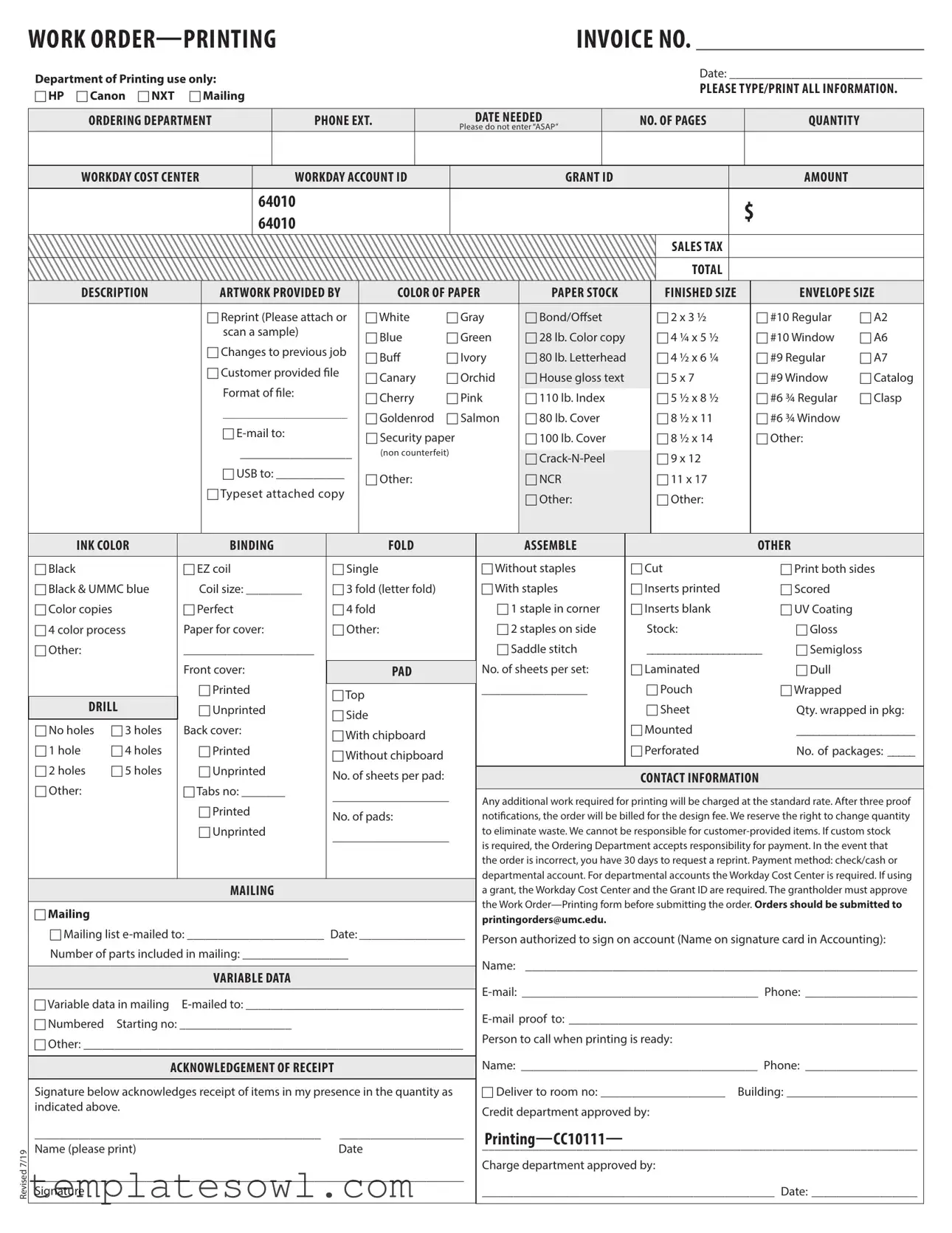
Fill Out Your Custom Work Order Form
The Custom Work Order form is an essential tool for ordering printing services, streamlining the entire process from initiation to completion. It includes critical information such as the ordering department’s details, contact information, and specific requirements for the project. Users must specify the type of printing needed—whether it’s a reprint or a new job—and provide important specifications like the number of pages, quantity, and paper stock. The form also allows for detailed selections, including ink colors, binding options, and additional features like UV coating or laminating. Essential financial information, including account IDs and estimated costs, helps departments manage their budgets effectively. Additionally, acknowledgment of receipt ensures accountability, guiding both the printer and the customer through the execution of the order. By capturing all this information in one comprehensive document, the Custom Work Order form minimizes confusion and enhances communication, ultimately leading to a smoother printing experience.
Custom Work Order Example
WORK |
INVOICE NO. _______________________ |
Revised 7/19
Department of Printing use only: |
|
|
|
|
|
|
|
|
|
|
|
|
|
Date: _______________________________ |
|||||||||||||
|
|
|
|
|
|
|
|
|
|
|
|
|
PLEASE TYPE/PRINT ALL INFORMATION. |
||||||||||||||
c HP c Canon c NXT |
c Mailing |
|
|
|
|
|
|
|
|
|
|
|
|
|
|||||||||||||
|
|
|
|
|
|
|
|
|
|
|
|
|
|
|
|
|
|
|
|
||||||||
|
|
|
|
|
|
|
|
|
|
|
|
|
|
|
|
|
|
|
|
|
|
|
|||||
ORDERING DEPARTMENT |
|
PHONE EXT. |
|
|
|
DATE NEEDED |
|
NO. OF PAGES |
|
|
|
QUANTITY |
|
||||||||||||||
|
|
|
|
|
|
|
|
|
|
|
|
|
Please do not enter “ASAP” |
|
|
|
|
|
|
|
|
|
|
||||
|
|
|
|
|
|
|
|
|
|
|
|
|
|
|
|
|
|
|
|
|
|
|
|
|
|
|
|
WORKDAY COST CENTER |
|
WORKDAY ACCOUNT ID |
|
|
|
GRANT ID |
|
|
|
|
|
|
|
AMOUNT |
|
||||||||||||
|
|
|
|
|
|
|
|
|
|
|
|
|
|
|
|
|
|
|
|
|
|
|
|
||||
|
|
|
|
|
64010 |
|
|
|
|
|
|
|
|
|
|
|
|
|
|
$ |
|
|
|||||
|
|
|
|
|
64010 |
|
|
|
|
|
|
|
|
|
|
|
|
|
|
|
|
||||||
|
|
|
|
|
|
|
|
|
|
|
|
|
|
|
|
|
|
|
|
|
|
|
|||||
|
|
|
|
|
|
|
|
|
|
|
|
|
|
|
|
|
|
|
|
SALES TAX |
|
|
|
|
|
|
|
|
|
|
|
|
|
|
|
|
|
|
|
|
|
|
|
|
|
|
|
|
|
|
|
|
|
|
|
|
|
|
|
|
|
|
|
|
|
|
|
|
|
|
|
|
|
|
|
TOTAL |
|
|
|
|
|
|
|
|
|
|
|
|
|
|
|
|
|
|
|
|
|
|
|
|
|
|
|||||||||
DESCRIPTION |
|
ARTWORK PROVIDED BY |
|
COLOR OF PAPER |
PAPER STOCK |
|
|
FINISHED SIZE |
|
|
|
ENVELOPE SIZE |
|||||||||||||||
|
|
|
|
|
|
|
|
|
|
|
|
|
|
|
|
|
|
|
|
|
|
|
|
||||
|
|
|
|
c Reprint (Please attach or |
|
c White |
c Gray |
c Bond/Offset |
|
|
c 2 x 3 ½ |
|
|
c #10 Regular |
c A2 |
||||||||||||
|
|
|
|
scan a sample) |
|
|
c Blue |
c Green |
c 28 lb. Color copy |
|
|
c 4 ¼ x 5 ½ |
|
|
c #10 Window |
c A6 |
|||||||||||
|
|
|
|
c Changes to previous job |
|
|
|
|
|
||||||||||||||||||
|
|
|
|
|
c Buff |
c Ivory |
c 80 lb. Letterhead |
|
|
c 4 ½ x 6 ¼ |
|
|
c #9 Regular |
c A7 |
|||||||||||||
|
|
|
|
c Customer provided file |
|
c Canary |
c Orchid |
c House gloss text |
|
|
c 5 x 7 |
|
|
c #9 Window |
c Catalog |
||||||||||||
|
|
|
|
Format of file: |
|
|
|
|
|
|
|||||||||||||||||
|
|
|
|
|
|
c Cherry |
c Pink |
c 110 lb. Index |
|
|
c 5 ½ x 8 ½ |
|
|
c #6 ¾ Regular |
c Clasp |
||||||||||||
|
|
|
|
____________________ |
|
|
|
|
|
||||||||||||||||||
|
|
|
|
|
c Goldenrod |
c Salmon |
c 80 lb. Cover |
|
|
c 8 ½ x 11 |
|
|
c #6 ¾ Window |
|
|||||||||||||
|
|
|
|
c |
|
|
|
c Security paper |
|
c 100 lb. Cover |
|
|
c 8 ½ x 14 |
|
|
c Other: |
|
||||||||||
|
|
|
|
__________________ |
|
|
|
|
|
|
|
||||||||||||||||
|
|
|
|
|
(non counterfeit) |
|
|
|
|
|
|
|
|
|
|
|
|
|
|||||||||
|
|
|
|
c |
|
|
c 9 x 12 |
|
|
|
|
|
|||||||||||||||
|
|
|
|
c USB to: ___________ |
|
|
|
|
|
|
|
|
|
|
|
|
|
||||||||||
|
|
|
|
|
c Other: |
|
|
|
c NCR |
|
|
c 11 x 17 |
|
|
|
|
|
||||||||||
|
|
|
|
cTypeset attached copy |
|
|
|
|
|
|
c Other: |
|
|
c Other: |
|
|
|
|
|
||||||||
|
|
|
|
|
|
|
|
|
|
|
|
|
|
|
|
|
|
|
|
|
|
||||||
|
|
|
|
|
|
|
|
|
|
|
|
|
|
|
|
|
|
|
|
|
|
|
|
|
|||
INK COLOR |
|
|
BINDING |
|
|
|
FOLD |
|
|
|
ASSEMBLE |
|
|
|
|
|
|
|
OTHER |
|
|||||||
|
|
|
|
|
|
|
|
|
|
|
|
|
|
|
|
|
|
|
|
|
|
|
|
|
|||
c Black |
|
|
c EZ coil |
|
c Single |
|
|
c Without staples |
|
c Cut |
|
|
|
c Print both sides |
|||||||||||||
c Black & UMMC blue |
|
Coil size: _________ |
c 3 fold (letter fold) |
|
|
c With staples |
|
c Inserts printed |
|
|
|
c Scored |
|
||||||||||||||
c Color copies |
|
c Perfect |
|
c 4 fold |
|
|
c 1 staple in corner |
|
c Inserts blank |
|
|
|
c UV Coating |
|
|||||||||||||
c 4 color process |
|
Paper for cover: |
|
c Other: |
|
|
c 2 staples on side |
|
Stock: |
|
|
|
c Gloss |
|
|||||||||||||
c Other: |
|
|
_____________________ |
|
|
|
|
|
|
c Saddle stitch |
|
_____________________ |
c Semigloss |
||||||||||||||
|
|
|
Front cover: |
|
|
|
|
|
|
No. of sheets per set: |
|
c Laminated |
|
|
|
c Dull |
|
||||||||||
|
|
|
|
|
|
PAD |
|
|
|
|
|
|
|
||||||||||||||
|
|
|
c Printed |
|
cTop |
|
|
|
|
_________________ |
|
|
c Pouch |
|
|
|
c Wrapped |
|
|||||||||
DRILL |
|
c Unprinted |
|
|
|
|
|
|
|
|
|
c Sheet |
|
|
|
Qty. wrapped in pkg: |
|||||||||||
|
|
c Side |
|
|
|
|
|
|
|
|
|
||||||||||||||||
c No holes |
c 3 holes |
|
Back cover: |
|
|
|
|
|
|
|
c Mounted |
|
|
|
_____________________ |
||||||||||||
|
|
c With chipboard |
|
|
|
|
|
|
|
|
|
||||||||||||||||
|
|
|
|
|
|
|
|
|
|
|
|
|
|
c Perforated |
|
|
|
|
|
||||||||
c 1 hole |
c 4 holes |
|
c Printed |
|
c Without chipboard |
|
|
|
|
|
|
|
|
|
No. of packages: _____ |
||||||||||||
|
|
|
|
|
|
|
|
|
|
|
|
|
|
|
|
|
|
|
|
|
|
|
|||||
c 2 holes |
c 5 holes |
|
c Unprinted |
|
No. of sheets per pad: |
|
|
|
|
|
|
|
|
|
|
|
|
|
|
|
|||||||
|
|
|
|
|
|
|
|
CONTACT INFORMATION |
|
|
|||||||||||||||||
c Other: |
|
|
cTabs no: _______ |
|
|
|
|
|
|
|
|
|
|||||||||||||||
|
|
|
___________________ |
|
Any additional work required for printing will be charged at the standard rate. After three proof |
||||||||||||||||||||||
|
|
|
|
|
|
|
|
|
|||||||||||||||||||
|
|
|
c Printed |
|
|
|
|
|
|
|
|||||||||||||||||
|
|
|
|
No. of pads: |
|
|
notifications, the order will be billed for the design fee. We reserve the right to change quantity |
||||||||||||||||||||
|
|
|
|
|
|
|
|
|
|
||||||||||||||||||
|
|
|
c Unprinted |
|
___________________ |
|
to eliminate waste. We cannot be responsible for |
||||||||||||||||||||
|
|
|
|
|
|
|
|
|
is required, the Ordering Department accepts responsibility for payment. In the event that |
||||||||||||||||||
|
|
|
|
|
|
|
|
|
|
|
|
|
|
||||||||||||||
|
|
|
|
|
|
|
|
|
|
|
|
|
|
the order is incorrect, you have 30 days to request a reprint. Payment method: check/cash or |
|||||||||||||
|
|
|
|
|
|
|
|
|
|
|
|
|
|
departmental account. For departmental accounts the Workday Cost Center is required. If using |
|||||||||||||
|
|
|
|
MAILING |
|
|
|
|
|
|
|
a grant, the Workday Cost Center and the Grant ID are required. The grantholder must approve |
|||||||||||||||
|
|
|
|
|
|
|
|
|
|
|
|
|
|
the Work |
|||||||||||||
c Mailing |
|
|
|
|
|
|
|
|
|
|
|
|
|
||||||||||||||
|
|
|
|
|
|
|
|
|
|
|
|
|
printingorders@umc.edu. |
|
|
|
|
|
|
|
|
|
|||||
|
|
|
|
|
|
|
|
|
|
|
|
|
|
|
|
|
|
|
|
|
|
|
|||||
c Mailing list |
Person authorized to sign on account (Name on signature card in Accounting): |
||||||||||||||||||||||||||
Number of parts included in mailing: _________________ |
|
|
|
|
|||||||||||||||||||||||
|
|
|
|
Name: |
_______________________________________________________________ |
||||||||||||||||||||||
|
|
|
|
|
|
|
|
|
|
|
|
|
|
||||||||||||||
|
|
|
|
VARIABLE DATA |
|
|
|
|
|
|
|
||||||||||||||||
|
|
|
|
|
|
|
|
|
|
|
|||||||||||||||||
|
|
|
|
|
|
|
|
|
|
|
|
|
|
||||||||||||||
c Variable data in mailing |
|||||||||||||||||||||||||||
c Numbered |
Starting no: __________________ |
|
|
|
|
|
|
|
|||||||||||||||||||
|
|
|
|
|
|
|
Person to call when printing is ready: |
|
|
|
|
|
|||||||||||||||
c Other: _____________________________________________________________ |
|
|
|
|
|
||||||||||||||||||||||
|
|
|
|
|
|
|
|
|
|
|
|
|
|||||||||||||||
|
|
|
|
|
|
|
|
|
|
|
|
Name: ______________________________________ Phone: __________________ |
|||||||||||||||
|
ACKNOWLEDGEMENT OF RECEIPT |
|
|
|
|
||||||||||||||||||||||
|
|
|
|
|
|
|
|
|
|
|
|
|
|
|
|
|
|
||||||||||
Signature below acknowledges receipt of items in my presence in the quantity as |
c Deliver to room no: ____________________ |
Building: _____________________ |
|||||||||||||||||||||||||
indicated above. |
|
|
|
|
|
|
|
|
|
|
|
Credit department approved by: |
|
|
|
|
|
||||||||||
|
|
|
|
|
|
|
|
|
|
|
|
|
|
|
|
|
|
|
|||||||||
______________________________________________ |
____________________ |
|
|
|
|
|
|
|
|
|
|||||||||||||||||
Name (please print) |
|
|
|
|
|
Date |
|
|
|
|
_____________________________________________________________________ |
||||||||||||||||
|
|
|
|
|
|
|
|
|
|
|
|
|
|
|
|
|
|
|
|
|
|||||||
_____________________________________________________________________ |
Charge department approved by: |
|
|
|
|
|
|||||||||||||||||||||
|
|
|
|
|
|
|
|
|
|
|
|
|
|||||||||||||||
Signature |
|
|
|
|
|
|
|
|
|
|
|
|
|
_______________________________________________ Date: _________________ |
|||||||||||||
|
|
|
|
|
|
|
|
|
|
|
|
|
|
|
|
|
|
|
|
|
|
|
|
|
|
|
|
Form Characteristics
| Fact Name | Details |
|---|---|
| Purpose | The Custom Work Order form is used to request printing services. |
| Ordering Department | Each order must specify the department placing the order. |
| Contact Information | Contact details are required for communication during the order process. |
| Payment Method | Accepted payment options include cash, check, or departmental account. |
| Grant Requirements | If a grant is involved, both the Workday Cost Center and Grant ID must be included. |
| Proof Approval | After three proof notifications, the design fee will apply for any additional changes. |
| Order Submission | Completed forms should be sent to the specified email address for processing. |
| Correction Request | Customers have 30 days to request a reprint in the event of an error. |
| Signature Requirement | A signature from an authorized person is required to validate the order. |
Guidelines on Utilizing Custom Work Order
Completing the Custom Work Order form is essential for ensuring your printing requests are processed correctly. Once you’ve filled out the form, it’s important to submit it as directed to ensure timely service. Follow these steps carefully to avoid any potential delays in your project.
- Locate the WORK ORDER—PRINTING INVOICE NO. section at the top and fill in the invoice number.
- Complete the Date section, indicating when you are submitting the order.
- Select a printing option: HP, Canon, NXT, or Mailing by checking the appropriate box.
- Fill in the ORDERING DEPARTMENT, PHONE EXT., and DATE NEEDED fields.
- Indicate the NO. OF PAGES, QUANTITY, and avoid using "ASAP".
- Provide the COST CENTER, ACCOUNT ID, GRANT ID, and any AMOUNT due.
- Detail the DESCRIPTION of the work needed.
- Check the box to indicate if ARTWORK IS PROVIDED BY CUSTOMER.
- Select the COLOR OF PAPER and PAPER STOCK needed from the provided options.
- Specify the FINISHED SIZE and ENVELOPE SIZE if applicable.
- If necessary, indicate if it's a Reprint or if there are Changes to a previous job.
- Fill in the INK COLOR required.
- Choose options for BINDING, FOLD, ASSEMBLE, and other preferences.
- Provide CONTACT INFORMATION, including name, email, and phone number.
- Complete sections for VARIABLE DATA if needed.
- Ensure the ACKNOWLEDGEMENT OF RECEIPT section is signed by the appropriate person.
- Submit the form to printingorders@umc.edu when finished.
What You Should Know About This Form
What is the purpose of the Custom Work Order form?
The Custom Work Order form is designed to streamline the ordering process for various printing services. It collects essential information such as the type of printing required, specific dimensions, quantities, and any special instructions. This ensures that all necessary details are provided to the printing department, which helps expedite the order and reduce potential errors.
How do I fill out the Custom Work Order form correctly?
To fill out the Custom Work Order form accurately, begin by typing or printing all required information clearly. Make sure to specify the ordering department, contact phone extension, and the date needed. Pay attention to details like the number of pages, quantity, and any specific paper stock or color preferences. If you have artwork or files to provide, indicate that clearly on the form. It's important to avoid vague terms such as “ASAP” and provide precise deadlines to ensure timely processing.
What should I do if an error occurs with my order?
If you notice an error in your order, you have 30 days to request a reprint after receiving the goods. Make sure to communicate any discrepancies promptly. For ordering issues not caused by printing mistakes, additional charges may apply. Always keep a record of your orders and confirmations to facilitate any necessary adjustments.
What are the payment methods for using the Custom Work Order form?
The payment options available include cash, check, or departmental accounts. If you are using a departmental account, you must provide the Workday Cost Center information. In cases where a grant is involved, both the Workday Cost Center and Grant ID are required. Make sure to get approval from the grantholder before submission to ensure your order will be processed smoothly.
Common mistakes
Filling out the Custom Work Order form accurately is essential to ensure smooth processing of your request. However, many people make mistakes that can delay their order. Awareness of these common errors can save you time and effort.
One frequent mistake is submitting "ASAP" as the needed date. Instead, it's best to provide a specific date. The department requires this information to prioritize and plan their workload effectively. Ambiguity can lead to misunderstandings and postponed deliveries.
Another common error arises when filling out the phone number and extension fields. If these details are missing or incorrect, it can hinder communication regarding your order. Make sure that you double-check this information to ensure that the right person is contacted when issues or inquiries arise.
Additionally, many users neglect to specify the quantity of items needed. The form provides space for this vital detail, and it's crucial to fill it out. Failing to do so may result in receiving an incorrect amount of materials or delays in processing your order.
Another mistake is not providing complete artwork details. Users often assume that just mentioning “artwork provided” is enough. It’s essential to attach or indicate any necessary files clearly. Lack of documentation can lead to confusion about the final product expected.
Also, some people overlook the payment method section. It’s important to indicate whether you’re paying by check, cash, or using a departmental account. Missing this detail can cause processing delays and lead to billing issues later.
Finally, failure to obtain the necessary authorization from the grantholder is often overlooked. This important step is required if grant funding is involved. Incomplete approvals can result in rejected orders and frustration.
By being mindful of these common mistakes, you can make the Custom Work Order submission process smoother and more efficient. Careful attention to detail helps ensure that you receive the products you need in a timely manner.
Documents used along the form
When you submit a Custom Work Order form for printing services, several other documents may accompany your request to ensure a smooth process. Each of these documents serves a specific purpose and helps clarify the details of your printing project. Here’s a brief overview of some commonly used forms and documents that often go hand-in-hand with a Custom Work Order.
- Request for Proposal (RFP): This document outlines the specific requirements for a project and invites vendors to submit proposals. It helps ensure that all parties have a clear understanding of the project scope.
- Design Proof: A sample of the suggested design is created before the final product is printed. It allows for necessary adjustments or corrections prior to proceeding with the order.
- Purchase Order (PO): This document serves as a formal agreement between a buyer and a seller, indicating the types and quantities of products requested, along with the agreed-upon prices.
- Billing Information Form: This form collects necessary financial information, including payment methods and account numbers, ensuring proper billing for services rendered.
- Delivery Instructions: This document provides specific directives regarding how and when the printed materials should be delivered, ensuring they arrive on time and at the correct location.
- Quality Assurance Checklist: This checklist verifies that every aspect of the order meets the specified quality standards before the work is finalized and delivered.
- Change Order Form: Should you need to alter details after the initial order is placed, this form records the changes and adjustments to avoid confusion later on.
Using these documents in conjunction with the Custom Work Order form can enhance communication and streamline the printing process. It's important to ensure that each form is filled out accurately and submitted in a timely manner to facilitate efficient service.
Similar forms
-
Purchase Order: Similar to the Custom Work Order form, a Purchase Order outlines the specifics of a request for goods or services. It includes details such as the quantity, description, and agreed-upon price. Both documents serve as formal requests to suppliers and help in tracking orders and managing budgets.
-
Service Agreement: This document formalizes the terms of service between a provider and a client. It includes expectations, deliverables, and payment terms, much like the Custom Work Order, which defines the scope of the printing job and the associated costs.
-
Invoice: An invoice is similar in that it details the services rendered and the amount due. It reflects the transactions that occur post-service delivery, whereas the Custom Work Order is created before the service, specifying what is to be done and the costs involved.
-
Job Ticket: Often used in the print industry, a Job Ticket provides instructions and specifications for a particular job. It is akin to the Custom Work Order in that both ensure that all necessary information about the project is clearly communicated to the responsible team members.
Dos and Don'ts
When filling out the Custom Work Order form, it is essential to follow specific guidelines to ensure the process runs smoothly. Here’s a list of things to do and avoid.
- Do type or print all information clearly to prevent any misunderstandings.
- Do specify the exact number of pages and the required quantity without using “ASAP.”
- Do provide a detailed description of the project, including the artwork and any special requirements.
- Do check that all necessary contact information is complete, including email and phone numbers.
- Do have the grant holder approve the work order before submission if using grant funding.
- Don't leave blanks in the order form. Complete every section to avoid delays.
- Don't forget to attach any required samples if indicated, especially for reprints or custom designs.
- Don't overlook the need for the correct cost center and account IDs when submitting departmental orders.
- Don't assume that your order will be processed without confirming it has been submitted correctly.
- Don't use unapproved materials or stock without prior confirmation from the ordering department.
Misconceptions
When it comes to the Custom Work Order form, several misconceptions can lead to confusion. Understanding these can help ensure that the process runs smoothly.
- All required fields must be filled out completely. Many assume that only the fields marked with an asterisk are mandatory. However, it is essential to provide as much information as possible to avoid delays or issues with the order.
- Submitting the order is a one-step process. Some people believe that once they submit the form, their job is done. In reality, there may be additional steps to confirm details or provide proof before the order is finalized.
- Emailing the form is sufficient for all orders. While emailing the form is an option, some orders require physical submission or specific approvals. It's important to check if a physical copy is also necessary.
- A reprint can be requested anytime. Many believe they can ask for a reprint whenever they notice an error. In fact, there is a 30-day window for requesting reprints, and this should be noted carefully.
- Custom stock can be ordered without prior approval. Some individuals think they can simply select custom stock on the form. However, this requires approval from the Ordering Department, ensuring proper payment handling.
Key takeaways
When using the Custom Work Order form, several essential points should be considered for a smooth and efficient process. Understanding these takeaways can minimize confusion and ensure clarity in your printing order.
- Complete All Required Sections: Each section must be filled out completely. Omitting information, especially regarding quantities and specific details, can lead to delays or errors in your order.
- Specify Deadline Needs: Clearly indicate the date the order is needed. Avoid using vague terms like "ASAP." This helps the printing department prioritize tasks effectively.
- Accountability for Provided Materials: If you are providing any materials for the printing job, take responsibility for their accuracy and quality. The department cannot be held liable for issues resulting from customer-provided items.
- Approval and Notifications: Ensure that a designated person has approved the order before submitting it. If you request any changes, keep in mind that after three proof notifications, design fees may be applied.
Browse Other Templates
Rehabilitation Authorization Form,Vocational Training Certification,Veteran Educational Enrollment Document,Training Program Authorization Form,VA Rehabilitation Program Application,Veteran Status Certification Form,Chapter 31 Enrollment Certificatio - Carefully read the instructions to avoid common mistakes in completion.
How to Take Ged - The parent or guardian’s signature verifies the accuracy of the information.