Fill Out Your E Zpass Ma Application Form
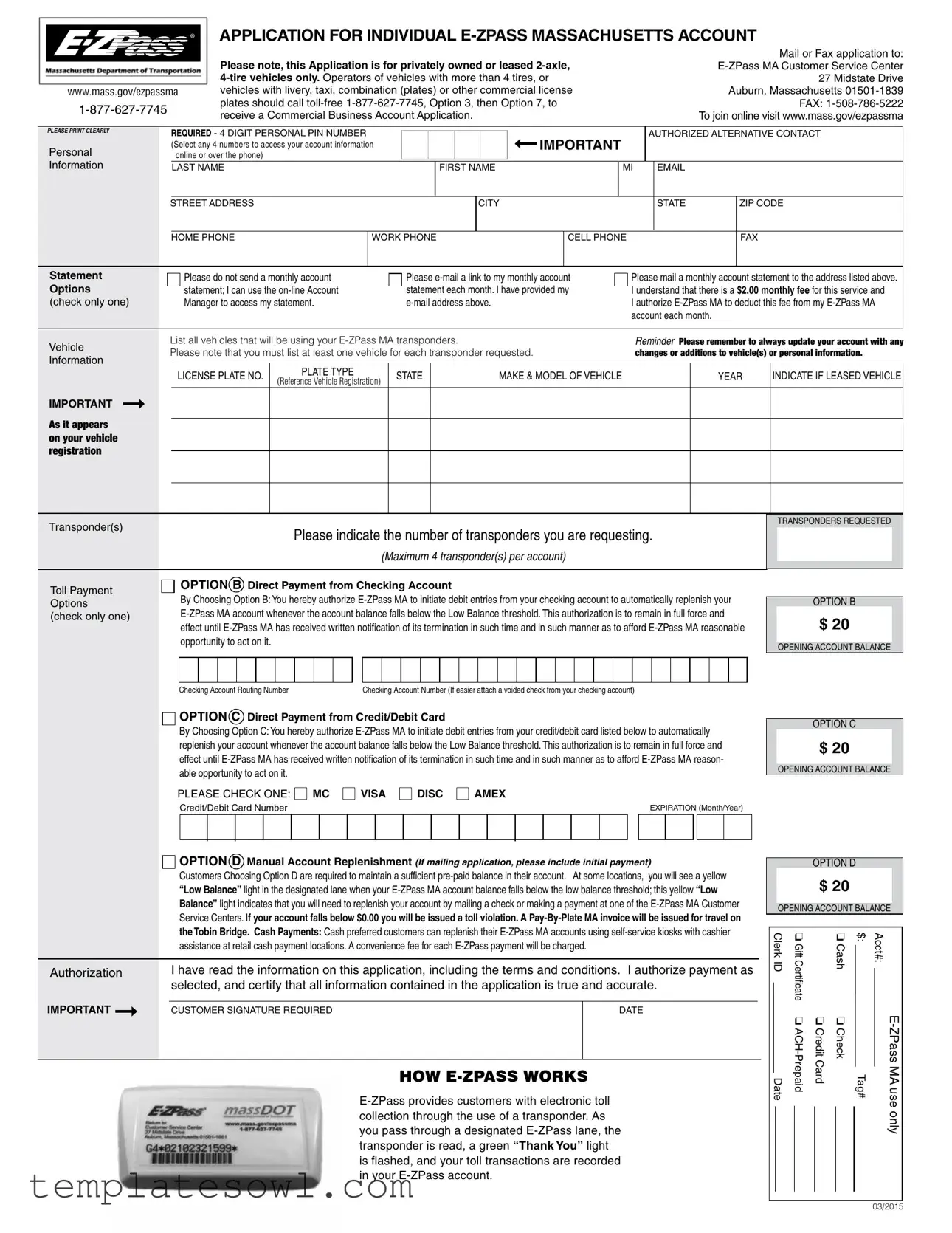
The E-ZPass Massachusetts Application Form serves as the gateway for individuals seeking to establish an electronic toll collection account. Designed specifically for privately owned or leased two-axle, four-tire vehicles, the form requires applicants to submit essential personal information, including their name, address, and contact numbers. The application also mandates the listing of at least one vehicle that will utilize the E-ZPass transponder, establishing a quick connection between users and their toll transactions. Furthermore, it includes sections for choosing payment options, where applicants can select between direct payment from a checking account, credit/debit card transactions, or manual account replenishment. An important aspect of the form is the 4-digit Personal Identification Number (PIN) that applicants create, which is necessary for accessing account information online or through customer service. Additional choices, like whether to receive monthly statements via email or postal service, are also outlined, enabling customizable service. Users must recall that maintaining accurate account information is crucial, as updates to vehicle details or personal data are required to avoid penalties. By signing the application, individuals acknowledge the terms and conditions laid out by the Massachusetts Department of Transportation, establishing the legal framework for their participation in the E-ZPass program.
E Zpass Ma Application Example


 ®
®
www.mass.gov/ezpassma
APPLICATION FOR INDIVIDUAL
Please note, this Application is for privately owned or leased |
Mail or Fax application to: |
27 Midstate Drive |
|
vehicles with livery, taxi, combination (plates) or other commercial license |
Auburn, Massachusetts |
plates should call |
FAX: |
receive a Commercial Business Account Application. |
To join online visit www.mass.gov/ezpassma |
PLEASE PRINT CLEARLY
Personal
Information
Statement
Options
(check only one)
Vehicle
Information
IMPORTANT ➞
As it appears on your vehicle registration
REQUIRED - 4 DIGIT PERSONAL PIN NUMBER |
|
|
|
|
|
|
|
|
|
➞ |
IMPORTANT |
|
|
AUTHORIZED ALTERNATIVE CONTACT |
|||||||||
|
|
|
|
|
|
|
|
|
|
||||||||||||||
(Select any 4 numbers to access your account information |
|
|
|
|
|
|
|
|
|
|
|
|
|
|
|
|
|
||||||
online or over the phone) |
|
|
|
|
|
|
|
|
|
|
|
|
|
|
|
|
|
|
|
|
|
|
|
|
|
|
|
|
|
|
|
|
|
|
|
|
|
|
|
|
|
|
|
|
|
|
|
LAST NAME |
|
|
|
|
|
FIRST NAME |
|
|
|
|
MI |
|
|
|
|
|
|
||||||
|
|
|
|
|
|
|
|
|
|
|
|
|
|
|
|
|
|
|
|
|
|
|
|
STREET ADDRESS |
|
|
|
|
|
|
|
CITY |
|
|
|
|
|
|
STATE |
|
ZIP CODE |
||||||
|
|
|
|
|
|
|
|
|
|
|
|
|
|
|
|
|
|
|
|
|
|
|
|
HOME PHONE |
|
WORK PHONE |
|
|
|
CELL PHONE |
|
|
|
|
|
|
FAX |
|
|||||||||
|
|
|
|
|
|
|
|
|
|
|
|
|
|
|
|
|
|
||||||
Please do not send a monthly account |
|
|
Please |
Please mail a monthly account statement to the address listed above. |
|||||||||||||||||||
statement; I can use the |
|
|
statement each month. I have provided my |
I understand that there is a $2.00 monthly fee for this service and |
|||||||||||||||||||
Manager to access my statement. |
|
|
|
|
|
|
|
I authorize |
|||||||||||||||
|
|
|
|
|
|
|
|
|
|
|
|
|
|
|
account each month. |
|
|
|
|
||||
|
|
|
|
|
|
|
|
|
|
|
|
|
|
|
|
|
|
|
|
|
|
|
|
List all vehicles that will be using your |
|
|
|
|
|
|
Reminder Please remember to always update your account with any |
||||||||||||||||
Please note that you must list at least one vehicle for each transponder requested. |
|
|
|
|
changes or additions to vehicle(s) or personal information. |
||||||||||||||||||
LICENSE PLATE NO. |
PLATE TYPE |
|
STATE |
|
|
|
|
|
MAKE & MODEL OF VEHICLE |
|
|
|
|
|
YEAR |
INDICATE IF LEASED VEHICLE |
|||||||
(Reference Vehicle Registration) |
|
|
|
|
|
|
|
|
|
||||||||||||||
|
|
|
|
|
|
|
|
|
|
|
|
|
|
|
|
|
|
|
|
|
|
||
|
|
|
|
|
|
|
|
|
|
|
|
|
|
|
|
|
|
|
|
|
|
|
|
|
|
|
|
|
|
|
|
|
|
|
|
|
|
|
|
|
|
|
|
|
|
|
|
|
|
|
|
|
|
|
|
|
|
|
|
|
|
|
|
|
|
|
|
|
|
|
|
|
|
|
|
|
|
|
|
|
|
|
|
|
|
|
|
|
|
|
|
|
|
|
|
Transponder(s) |
Please indicate the number of transponders you are requesting. |
|
|
|
(Maximum 4 transponder(s) per account) |
TRANSPONDERS REQUESTED
Toll Payment Options (check only one)

 OPTION B Direct Payment from Checking Account
By Choosing Option B: You hereby authorize
OPTION B
$ 20
OPENING ACCOUNT BALANCE
Checking Account Routing NumberChecking Account Number (If easier attach a voided check from your checking account)

 OPTION C Direct Payment from Credit/Debit Card
By Choosing Option C: You hereby authorize
|
PLEASE CHECK ONE: |
|
MC |
|
VISA |
|
DISC |
|
AMEX |
|
||||||||||||||||||||||||
|
|
Credit/Debit Card Number |
|
|
|
|
|
|
|
|
|
|
|
|
|
|
EXPIRATION (Month/Year) |
|
||||||||||||||||
|
|
|
|
|
|
|
|
|
|
|
|
|
|
|
|
|
|
|
|
|
|
|
|
|
|
|
|
|
|
|
|
|
|
|
|
OPTION D Manual Account Replenishment (If mailing application, please include initial payment) |
|
||||||||||||||||||||||||||||||||
|
Customers Choosing Option D are required to maintain a sufficient |
|
||||||||||||||||||||||||||||||||
|
“Low Balance” light in the designated lane when your |
|
||||||||||||||||||||||||||||||||
|
Balance” light indicates that you will need to replenish your account by mailing a check or making a payment at one of the |
|
||||||||||||||||||||||||||||||||
|
Service Centers. If your account falls below $0.00 you will be issued a toll violation. A |
|
||||||||||||||||||||||||||||||||
|
the Tobin Bridge. Cash Payments: Cash preferred customers can replenish their |
|
||||||||||||||||||||||||||||||||
|
assistance at retail cash payment locations. A convenience fee for each |
|
||||||||||||||||||||||||||||||||
|
|
|
|
|
|
|
|
|
|
|
|
|
|
|
|
|
|
|
|
|
|
|
|
|
|
|
|
|||||||
Authorization |
I have read the information on this application, including the terms and conditions. I authorize payment as |
|
||||||||||||||||||||||||||||||||
|
selected, and certify that all information contained in the application is true and accurate. |
|
||||||||||||||||||||||||||||||||
IMPORTANT ➞ |
|
|
|
|
|
|
|
|
|
|
|
|
|
|
|
|
|
|
|
|
|
|
|
|
|
|
|
|
|
|
|
|
|
|
CUSTOMER SIGNATURE REQUIRED |
|
|
|
|
|
|
|
|
|
|
|
|
|
|
|
|
DATE |
|
||||||||||||||||
|
|
|
|
|
|
|
|
|
|
|
|
|
|
|
|
|
|
|
|
|
|
|
|
|
|
|
|
|
|
|
|
|
|
|
HOW
OPTION C
$ 20
OPENING ACCOUNT BALANCE
OPTION D
$ 20
OPENING ACCOUNT BALANCE
|
Clerk ID |
❏ Gift Certificate |
|
❏ Cash |
$: |
Acct#: |
|
|
|
||||
|
|
|
|
|
||
|
|
❏ |
❏ Credit Card |
❏ Check |
|
|
|
Date |
|
Tag# |
|||
|
|
|||||
|
|
|
|
|
|
only |
|
|
|
|
|
|
|
|
|
|
|
|
|
|
03/2015
The Massachusetts Department of Transportation (“MassDOT”) establishes these terms and conditions that govern the use of the Electronic Toll Collection (“ETC”)
Use of the
The following terms and conditions supersede any terms and conditions you may have previously received. These terms and conditions, together with your application, constitute the
1. TERMS
a)MassDOT may, at any time, suspend or terminate your
b)MassDOT reserves the right to reject any
c)If any of the terms of this agreement are declared or found to be illegal, unenforceable or void, then MassDOT and
the
2. TRANSPONDER USAGE
a)You agree that the
b)You agree to affix the
c)You agree that you may not use any designated
d)You acknowledge that you are required to enter and exit all toll plazas through a designated
e)When traveling on the Massachusetts Turnpike’s ticket system (interchanges west of Route
f)You agree that you will comply with the posted speed limit. You are advised and you agree that exceeding the posted speed limit will subject you to fines and penalties and/or termination of your
g)You agree to obey all applicable federal and state laws and regulations governing the use and operation of Mass- DOT’s facilities and the
h)You agree to pay all costs associated with the use of the
i)You agree to obey all signage, postings and signal messages in the
j)MassDOT may enter into reciprocal agreements with other agencies. If your
k)In accordance with 700 CMR 7.03(9), Two Axle Commercial Vehicles, as defined in MassDOT’s regulations, op- erating on certain ways where MassDOT assesses a toll are required to use
l)A roadway or facility that has All Electronic Tolling (“AET”) does not have designated
may be used by an
3. LOST/STOLEN AND DEFECTIVE TRANSPONDERS
a)You agree that you will notify the Customer Service Center immediately if your transponder(s) is lost or stolen. You agree that you are responsible for any costs associated with any and all uses of the
b)Defective
At the discretion of MassDOT, defective
4. YOUR
a)You authorize MassDOT to access and charge all costs associated with the use of your
b)You authorize MassDOT to access and charge all fees associated with your participation in the
c)You acknowledge that MassDOT may review periodically the activity in your account and adjust your replenish- ment amount, if applicable, to more accurately reflect the average monthly charges and fees incurred by you.
d)You shall not assign the obligations or benefits of this agreement without the express written consent of MassDOT or the Customer Service Center.
e)If you have selected “Automatic Account Replenishment” as the payment method for your
f)If you have selected “Manual, Credit/Debit, or Bank Account Replenishment” as the payment method for your
provided any outstanding balance is paid in full and you enroll in an automatic account replenishment payment method which includes use of a valid credit/debit card or bank account.
g)You acknowledge and agree that MassDOT shall not pay any interest on any
h)You acknowledge and agree that you will be charged a fee for each returned check for your
i)You certify that all information contained in your
j)Administrative fees may be billed directly to your account. You may contest the imposition of said administra- tive fees in writing to the Customer Service Center within sixty (60) days of the disputed charge. If the fee is rescinded, your
k)Unpaid balances due to MassDOT may be turned over to a collection agency for enforcement and collection activities along with any other legal action that MassDOT is authorized to pursue to recover such monies owed.
5.VIOLATIONS AND “VIDEO TOLL”
a)In cases where your
b)You acknowledge and accept that you are required to maintain your
c)You agree that in the event your account falls to or below $0.00 due to an expired or rejected credit card, an insuf- ficient bank account balance or an insufficient
d)Any use of an
e)If you rent or lease a vehicle and receive an
f)You are advised and acknowledge that violation enforcement cameras are used in the
g)Failure to pay or appeal violation fines within the time period and in the manner described on the violation notice may result in additional Violation Administrative/Late Fees, the termination of your account, the
h)You agree that the information provided to, or contained in your
administrative or legal proceeding by MassDOT to collect any monies owed by you to MassDOT.
6. DISPUTES/REFUNDS
In accordance with Section 169 of Chapter 25 of the Acts of 2009, the time permissible for an account holder to dis- pute an overcharge of the electronic toll system is three (3) years from the time of the overcharge. If you dispute any overcharge to your ETC account you agree to notify the Customer Service Center in writing at 27 Midstate Drive, Auburn, MA 01501, within such period. MassDOT will investigate the dispute and will make a good faith determination of whether an adjustment is warranted. You agree that the good faith determination of MassDOT with regard to your dispute shall be final and binding upon you.
7. DISCLAIMER
a)MassDOT shall have no responsibility or liability to you for any loss, cost, expense or damage to you, any pas- sengers or your vehicle, arising out of your failure to comply with any laws or regulations, or any terms and condi- tions of the
b)Under no circumstances shall MassDOT have any liability for any consequential, indirect, special, incidental, or punitive damages of any kind arising out of your participation in the
c)Except for its obligations under paragraph 3 (b) above, MassDOT makes no representations or warranties, ex- press or implied, with respect to the merchant ability or fitness for a particular purpose or any other reason with respect to
d)Except as otherwise specified herein, MassDOT shall have no liability or obligation of any kind what so ever arising out of a) your use of or the performance of the
e)MassDOT does not warrant that there will be any
f)You agree to indemnify, defend, and hold harmless MassDOT from and against any and all damage, loss, cost,
expense, or liability relating to, arising from, or as a result of the use or performance of the
8. COLLECTION EXPENSES
You agree to pay MassDOT’s costs, including attorneys’ fees, required to enforce the terms and conditions of the
9.
In accordance with the provisions of G.L. c. 6C, Section 13 (a), MassDOT and the Customer Service Center shall hold all customer account information confidential, except as otherwise authorized for MassDOT administrative and legal proceedings.
10. GOVERNING LAWS
The
11. TERMINATION
You may terminate this agreement at any time by returning your transponder(s) to the Customer Service Center. Transponders should be returned in person or by first class prepaid mail. Transponders will remain the property of MassDOT under all circumstances. Upon termination of this agreement and return of your transponder(s), your account balance will be refunded to you. All outstanding charges will be deducted prior to refund.
12. MODIFICATIONS
MassDOT may change the
Effective as of December 2014
Form Characteristics
| Fact Name | Description |
|---|---|
| Application Purpose | This application is used to open an individual E-ZPass account for privately owned or leased 2-axle, 4-tire vehicles in Massachusetts. |
| Contact Information | For assistance, you can call 1-877-627-7745 or visit www.mass.gov/ezpassma. |
| Transponder Limit | Each account can request a maximum of four transponders. |
| Payment Options | Three payment methods are available: automatic debit from a checking account, credit/debit card payments, or manual replenishment. |
| Monthly Fees | A $2.00 monthly fee applies if you select electronic statements. This fee will be deducted directly from your E-ZPass MA account. |
| Governing Laws | The E-ZPass program is governed by the laws of the Commonwealth of Massachusetts, including applicable regulations by MassDOT. |
Guidelines on Utilizing E Zpass Ma Application
Completing the E-ZPass Massachusetts application form is an essential step for anyone seeking convenient toll payment options. Make sure to gather your personal and vehicle details before starting. Following these steps will guide you through the process efficiently, ensuring everything is filled out correctly.
- Provide your personal information clearly. Fill in your last name, first name, middle initial, email address, street address, city, state, and ZIP code.
- Add your contact numbers: home phone, work phone, cell phone, and fax number if applicable.
- Choose your statement options. Decide if you prefer an email link, a mailed account statement, or to access your statements online. If you opt for email, ensure to include your email address in the personal information section.
- List the vehicles that will use your E-ZPass transponder(s). Include each vehicle's license plate number, plate type, state, make and model, year, and whether the vehicle is leased.
- Indicate how many transponders you are requesting (maximum of 4 per account).
- Select a toll payment option by checking the appropriate box: Automatic payment from a checking account, credit/debit card, or manual replenishment.
- For direct payment options, fill in the necessary bank or credit card details accurately.
- Read the terms and conditions carefully, then provide your signature and date to authorize the application.
Once you have completed the form, review it for accuracy. Submit your application by mailing or faxing it to the E-ZPass MA Customer Service Center at the address indicated. Ensuring that everything is complete and accurate will expedite your account setup process.
What You Should Know About This Form
1. What is the E-ZPass MA application form used for?
The E-ZPass MA application form is used to create an account for individuals who wish to enroll in the E-ZPass program in Massachusetts. This program allows users to pay tolls electronically using a transponder, making travel on toll roads more convenient and efficient.
2. Who can fill out the E-ZPass MA application?
This application is designed for individuals who own or lease privately owned vehicles that have 2 axles and up to 4 tires. If you have a vehicle that fits these criteria, you can complete the application. Commercial vehicle operators or those with more than 4 tires should contact customer service for the appropriate forms.
3. How many transponders can I request on my application?
You can request a maximum of four transponders per account. Make sure to list all vehicles that will be using the transponders on your application to ensure proper setup.
4. What payment options are available for maintaining my E-ZPass account?
The application offers several payment options: Direct Payment from a Checking Account, Direct Payment from a Credit/Debit Card, and Manual Account Replenishment. Choose the one that best suits your needs, keeping in mind that certain fees may apply based on your selection.
5. What is the opening balance I need to maintain in my E-ZPass account?
An opening balance of $20 is required when you set up your E-ZPass account. This balance helps ensure that you have enough funds available for toll payments as you travel.
6. What should I do if my transponder is lost or stolen?
If your transponder is lost or stolen, it’s important to notify the Customer Service Center immediately. You will be responsible for any charges incurred prior to reporting the loss. There may also be a replacement fee for lost or stolen transponders.
7. How can I update my personal information or vehicle details?
It’s crucial to keep your account information current. Anytime you change your vehicle or personal information, you should update your account. This can usually be done online or by contacting customer service directly.
8. Are there any fees I should be aware of?
Yes, there may be administrative fees depending on how you manage your account. For example, there’s a $2 monthly fee for those who choose to receive electronic statements. It's important to review any applicable fees when completing your application.
9. How do I terminate my E-ZPass account?
You can terminate your E-ZPass account at any time by returning your transponder(s) to the Customer Service Center. Make sure to return them in person or through prepaid mail, as transponders remain the property of MassDOT even if you discontinue use.
Common mistakes
Completing the E-ZPass MA Application form can be straightforward, yet several common mistakes can lead to delays or rejected applications. One significant error is failing to provide complete personal information. Individuals often skip critical fields, such as their last name or email address. Each section must be filled out accurately to avoid any processing issues.
Another frequent mistake involves the incorrect entry of vehicle details. Applicants may list vehicles not registered under their name, which can lead to confusion and potential violations. It’s essential to ensure that each vehicle listed corresponds with the submitted vehicle registration documentation to prevent any discrepancies.
People sometimes overlook the requirement for a personal PIN number. This four-digit code is required for accessing account information. If omitted, it creates an extra hurdle in managing the account. Additionally, careless errors, such as typos in the license plate number or vehicle identification number, can result in improper account setup.
Many applicants also underestimate the importance of selecting a payment option. Option B (checking account), Option C (credit/debit card), or Option D (manual replenishment) selections must align with the applicant's financial situation. Selecting an incorrect option can lead to issues with account funding and replenishment, complicating toll payment processes.
Furthermore, individuals often forget to indicate if their vehicle is leased. This information is crucial, as it affects both account management and potential liability for toll violations. Missing this detail could lead to processed applications that do not reflect the vehicle ownership correctly.
There is also a tendency to neglect signature requirements. Failing to sign and date the application can result in an immediate rejection, requiring the applicant to resubmit the entire form. Thus, reviewing the entire application for a signature is vital before submission.
Many applicants assume that they can use the E-ZPass account without regular updates. However, failing to report changes in personal or vehicle information can lead to complications, such as failed transactions or toll violations. Keeping the account updated is an ongoing responsibility for E-ZPass users.
It is also common for applicants to miss providing a valid email address. This email serves as a crucial line of communication regarding account status and updates. An invalid or missing email can result in missed notifications that are essential for maintaining account integrity.
Lastly, misunderstanding the terms and conditions can create issues later on. Applicants should take the time to read these thoroughly. Familiarity with the regulations, including potential penalties for violations, is essential to fully utilizing the E-ZPass system and avoiding unexpected fees.
Documents used along the form
The E-ZPass MA Application form is an essential document for individuals wishing to establish an electronic toll collection account in Massachusetts. Along with this application, several other forms and documents are commonly required. Understanding these can help streamline the process and ensure a successful application.
- Vehicle Registration Document: This document serves as proof of vehicle ownership or leasing. It lists the details of the car, including the make, model, and license plate number. Providing this ensures that the vehicle is registered correctly with E-ZPass.
- Bank Account Information: If you choose the direct payment option from your checking account, you'll need to submit routing and account numbers. This allows E-ZPass to automatically replenish your balance when it gets low.
- Credit/Debit Card Information: If you prefer to use a credit or debit card for automatic replenishment, you'll need to provide your card details. This is critical to ensure that your account remains funded to cover tolls.
- Authorization Form (for Direct Debit): This form allows E-ZPass to withdraw funds automatically from your indicated bank account or card. Signing this is necessary for uninterrupted service and account funding.
These supplemental documents work together with the E-ZPass MA Application to establish a seamless toll payment solution. It’s important to gather all required information in advance to avoid delays in account activation.
Similar forms
The E-ZPass Massachusetts application form is similar to several other application documents. Here are six comparable documents, along with their similarities:
- Driver's License Application: Both require personal identification information such as name, address, and contact details to authorize the issuance of a permit or transponder.
- Vehicle Registration Form: Like the E-ZPass form, this document collects vehicle identification details, including make, model, and license plate number.
- Insurance Application: Both include clauses that require the applicant to provide personal information and authorize payments connected to ongoing services.
- Bank Account Opening Form: Similar to the E-ZPass application, this form includes bank routing numbers and account numbers for automated payments.
- Membership Application for Toll Facilities: This document gathers similar vehicle and personal information aimed at facilitating account management for toll payments.
- Credit Card Application: Both the E-ZPass form and credit card applications require identification information and authorize the service provider to charge fees against an account.
Dos and Don'ts
- Do print clearly when filling out the application to ensure all information is legible.
- Do check the correct vehicle type and license plate for accurate account setup.
- Do provide an email address to receive your monthly account statements electronically.
- Do list at least one vehicle per transponder requested to avoid processing delays.
- Don't forget to update your account information if there are any changes to your vehicles or personal details.
- Don't send cash or checks by mail without ensuring you have included your initial payment if required.
- Don't skip providing a contact number, as this can delay customer service responses.
- Don't use a vehicle not listed on your application to avoid violation fees.
Misconceptions
The E-ZPass Massachusetts Application form can lead to several misconceptions. Here are five common misunderstandings, along with clarifications for each.
-
Misconception 1: The application is only for cars.
In reality, this application is specifically designed for privately owned or leased 2- and 4-axle vehicles. Those operating vehicles with more than 4 tires or livery vehicles must obtain a different application.
-
Misconception 2: You can submit any amount of vehicles on one application.
Applicants must list at least one vehicle corresponding to each transponder requested. The application will not process without this information.
-
Misconception 3: E-ZPass accounts are free to maintain.
There is a $2.00 monthly fee for certain services. It is essential to understand any charges incurred when enrolling in the E-ZPass program.
-
Misconception 4: You can use the E-ZPass lane with any vehicle, regardless of registration.
Only vehicles that have been listed and approved in the account may use designated E-ZPass lanes. Using an unauthorized vehicle can lead to fines and penalties.
-
Misconception 5: Once signed up, an E-ZPass account does not require any updates.
Changes to personal information or vehicles must be reported. Maintaining accurate records is crucial in avoiding potential fines and violations.
Key takeaways
Key Takeaways for Completing and Using the E-ZPass MA Application Form
- Clear Information Required: It’s crucial to print your personal information clearly. This includes your name, address, and vehicle details. Providing accurate information will help avoid delays in processing your application.
- Transponder Limits: You can request up to four transponders per account. Make sure to list all vehicles that will use these transponders, as each must be registered properly.
- Payment Options: Choose your preferred payment method carefully. You can opt for automatic replenishment through a bank account or credit/debit card, or select manual payments. Be aware that a low balance can lead to violations and fines.
- Regular Updates Necessary: Always keep your account updated with any changes in your vehicle or personal information. Failing to do so could result in penalties or issues with transactions.
Browse Other Templates
Military Leave Application,Service Credit Request Form,Defined Contribution Military Benefits Form,Michigan Military Leave Documentation,Application for Military Service Retirement Credit,Military Service Credit Application,Defined Contribution Plan - Military service during employment should be documented to qualify for benefits.
Seating Expansion Evaluation Form,DBPR Restaurant Seating Assessment,Florida Food Service Seating Change Form,Public Service Establishment Capacity Approval Form,Restaurant Seating Capacity Evaluation,DBPR HR Seating Compliance Form,Seating Capacity - It is critical for establishments to adhere to local regulations when planning seating changes.