Fill Out Your Si 100 Form
The Statement of Information, known as Form SI-100, serves as an essential tool for various types of corporations in California, particularly nonprofits, credit unions, and general cooperatives. This form must be filed with the California Secretary of State within 90 days of the entity's registration and subsequently every two years during a designated filing period. Additionally, organizations can make updates to their previously filed information by submitting a new SI-100, ensuring that the details on record are current. It is important to note that some corporations, such as stock and agricultural cooperatives, cannot use this form and should instead opt for Form SI-550. The active or suspended status of the corporation must be verified before filing, and fees apply for both initial and periodic filings. These fees are structured to facilitate the process, maximizing efficiency for those who file online at the Secretary of State's website. For those who may need a copy or certified version of their Statement of Information, associated fees apply, reflecting the costs involved in processing such requests. As various entities must adhere to specific timelines and regulations when filing, understanding the Form SI-100 guidelines and requirements is crucial for compliance and organizational management.
Si 100 Example
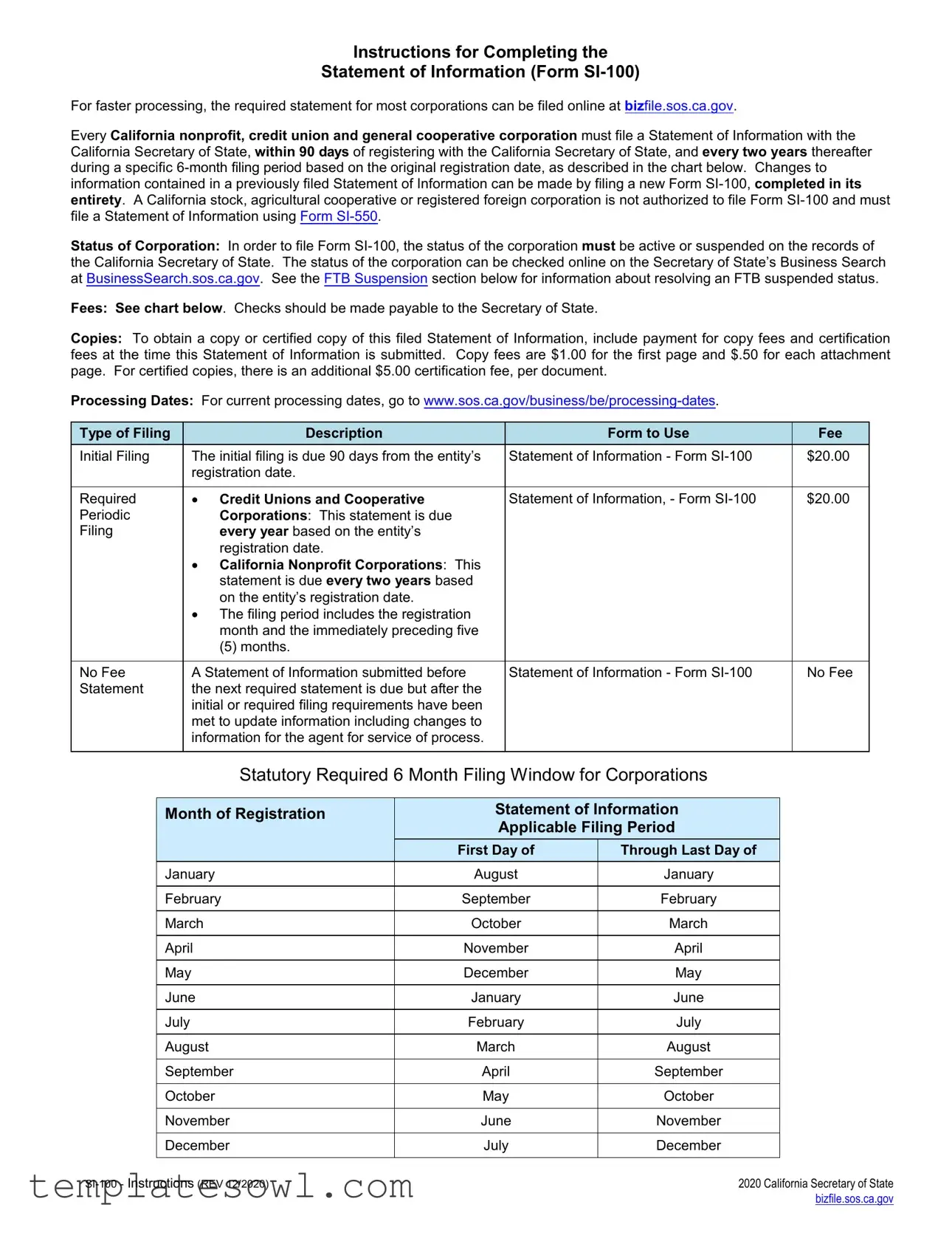
Instructions for Completing the
Statement of Information (Form
For faster processing, the required statement for most corporations can be filed online at bizfile.sos.ca.gov.
Every California nonprofit, credit union and general cooperative corporation must file a Statement of Information with the California Secretary of State, within 90 days of registering with the California Secretary of State, and every two years thereafter during a specific
Status of Corporation: In order to file Form
Fees: See chart below. Checks should be made payable to the Secretary of State.
Copies: To obtain a copy or certified copy of this filed Statement of Information, include payment for copy fees and certification fees at the time this Statement of Information is submitted. Copy fees are $1.00 for the first page and $.50 for each attachment page. For certified copies, there is an additional $5.00 certification fee, per document.
Processing Dates: For current processing dates, go to
Type of Filing |
Description |
Form to Use |
Fee |
Initial Filing |
The initial filing is due 90 days from the entity’s |
Statement of Information - Form |
$20.00 |
|
registration date. |
|
|
|
|
|
|
Required |
• Credit Unions and Cooperative |
Statement of Information, - Form |
$20.00 |
Periodic |
Corporations: This statement is due |
|
|
Filing |
every year based on the entity’s |
|
|
|
registration date. |
|
|
|
• California Nonprofit Corporations: This |
|
|
|
statement is due every two years based |
|
|
|
on the entity’s registration date. |
|
|
|
• The filing period includes the registration |
|
|
|
month and the immediately preceding five |
|
|
|
(5) months. |
|
|
|
|
|
|
No Fee |
A Statement of Information submitted before |
Statement of Information - Form |
No Fee |
Statement |
the next required statement is due but after the |
|
|
|
initial or required filing requirements have been |
|
|
|
met to update information including changes to |
|
|
|
information for the agent for service of process. |
|
|
|
|
|
|
Statutory Required 6 Month Filing Window for Corporations
Month of Registration |
Statement of Information |
|
|
Applicable Filing Period |
|
|
First Day of |
Through Last Day of |
January |
August |
January |
|
|
|
February |
September |
February |
|
|
|
March |
October |
March |
|
|
|
April |
November |
April |
|
|
|
May |
December |
May |
|
|
|
June |
January |
June |
|
|
|
July |
February |
July |
|
|
|
August |
March |
August |
|
|
|
September |
April |
September |
|
|
|
October |
May |
October |
|
|
|
November |
June |
November |
|
|
|
December |
July |
December |
|
|
|
2020 California Secretary of State |
|
|
bizfile.sos.ca.gov |
If you are not completing this form online, please type or print legibly in black or blue ink. Complete the Statement of
Information (Form
Item |
Instruction |
Tips |
1. |
Enter the name of the corporation exactly as it |
|
|
appears on file with the California Secretary of |
|
|
State, including the entity ending (ex: “Jones & |
|
|
Company, Inc.” or “Smith Construction |
|
|
Company”). |
|
|
|
|
2. |
Enter the |
• The |
|
corporation by the California Secretary of |
State on the corporation’s registration document filed with the |
|
State at the time of registration. |
California Secretary of State. |
|
|
• To ensure you have the correct Entity Number and exact name |
|
|
of the corporation, look to your registration document filed with |
|
|
the California Secretary of State and any name change |
|
|
amendments. |
|
|
• Secretary of State Records can be accessed online through our |
|
|
Business Search at BusinessSearch.sos.ca.gov. While |
|
|
searching the Business Search, be sure to identify your |
|
|
corporation correctly including the jurisdiction that matches your |
|
|
corporation. |
|
|
|
3a. |
Enter the complete street address, city, state, |
• If the corporation has a principal office in California, the |
|
and zip code of the corporation’s principal office |
complete street address is required, including the street name |
|
in California, if any. |
and number, city and zip code. |
|
|
• Address must be a physical address. |
|
|
• Do not enter a P.O. Box address, an “in care of” address, or |
|
|
abbreviate the name of the city. |
|
|
|
3b. |
If different from the address in Item 3a, enter the |
• This address will be used for mailing purposes and may be a |
|
complete mailing address, city, state, and zip |
P.O. Box address or “in care of” an individual or entity. |
|
code of the corporation. |
• Do not abbreviate the name of the city. |
|
|
|
|
|
|
4. |
Enter the name and complete business or |
• Do not abbreviate the name of the city. |
|
residential address of the corporation’s: |
• Every corporation is required to have at least these 3 officers |
|
a. Chief Executive Officer (i.e. president) |
|
|
|
|
|
b. Secretary and |
• Any number of offices may be held by the same person unless |
|
c. Chief Financial Officer (i.e. treasurer). |
the articles of incorporation or bylaws provide otherwise, except, |
|
in the case of a nonprofit public benefit or religious corporation, |
|
|
|
|
|
|
neither the secretary nor the chief financial officer or treasurer |
|
|
may serve concurrently as the president or chairperson of the |
|
|
board (Section 5213 or 9213). |
|
|
• An additional title for the Chief Executive Officer or Chief |
|
|
Financial Officer may be added; however, the preprinted titles on |
|
|
this form must not be altered, except in the case of a general |
|
|
cooperative corporation, which may include the name and |
|
|
address of its general manager instead of the name and |
|
|
address of its chief executive officer. (Section 12570(a).) |
|
|
• Unless the articles of incorporation or bylaws provide otherwise, |
|
|
the president, or if there is no president, the chairperson of the |
|
|
board, is the chief executive officer of the corporation. |
|
|
• Unless the articles of incorporation or bylaws provide otherwise, |
|
|
if there is no chief financial officer, the treasurer is the chief |
|
|
financial officer of the corporation. |
|
|
|
2020 California Secretary of State |
|
|
bizfile.sos.ca.gov |
5. |
The corporation must have an Agent for |
• An Agent for Service of Process is responsible for accepting legal |
|
|
Service of Process. |
documents (e.g. service of process, lawsuits, subpoenas, other |
|
|
There are two types of Agents that can be |
types of legal notices, etc.) on behalf of the corporation. |
|
|
named: |
• You must provide information for either an individual OR a |
|
|
• an individual (e.g. owner, director or any other |
|
|
|
registered corporate agent, not both. |
|
|
|
individual) who resides in California with a |
• If using a registered corporate agent, the corporation must have a |
|
|
physical California street address; OR |
|
|
|
• a registered corporate agent qualified with the |
current agent registration certificate on file with the California |
|
|
Secretary of State as required by Section 1505. |
|
|
|
California Secretary of State. |
|
|
|
|
|
|
|
|
|
|
5a & b. |
If Individual Agent: |
• The complete street address is required, including the street |
|
|
• Enter the name of the agent for service of |
name and number, city and zip code. |
|
|
|
|
|
|
process and the agent’s complete California |
• Do not enter a P.O. Box address, an “in care of” address, or |
|
|
street address, city and zip code. |
|
|
|
abbreviate the name of the city. |
|
|
|
• If an individual is designated as the agent, |
|
|
|
• Many times, a small corporation will designate an officer or |
|
|
|
complete Items 5a and 5b ONLY. Do not |
|
|
|
complete Item 5c. |
director as the agent for service of process. |
|
|
|
• The individual agent should be aware that the name and the |
|
|
|
physical street address of the agent for service of process is a |
|
|
|
public record, open to all (as are all the addresses of the |
|
|
|
corporation provided in filings.) |
|
|
|
|
|
5c. |
If Registered Corporate Agent: |
• Before a corporation is designated as agent for another |
|
|
• Enter the name of the registered corporate |
corporation, that corporation must have a current agent |
|
|
registration certificate on file with the California Secretary of State |
|
|
|
agent exactly as registered in California. |
|
|
|
as required by Section 1505 stating the address(es) of the |
|
|
|
• If a registered corporate agent is designated |
|
|
|
registered corporate agent and the authorized employees that will |
|
|
|
as the agent, complete Item 5c ONLY. Do |
accept service of process of legal documents and notices on |
|
|
not complete Items 5a and 5b. |
behalf of the corporation. |
|
|
|
• Advanced approval must be obtained from a registered |
|
|
|
corporate agent prior to designating that corporation as your |
|
|
|
agent for service of process. |
|
|
|
• No California or foreign corporation may register as a California |
|
|
|
corporate agent unless the corporation currently is authorized to |
|
|
|
engage in business in California and is in good standing on the |
|
|
|
records of the California Secretary of State. |
|
|
|
• Provide your Registered Corporate Agent’s exact name as |
|
|
|
registered with the California Secretary of State. To confirm that |
|
|
|
you are providing the exact name of the Registered Corporate |
|
|
|
Agent, go to |
|
|
|
https://businesssearch.sos.ca.gov/cbs/List1505Agents. |
|
6. |
Check the box if the corporation is formed to |
• Common Interest Developments (CIDs) are a type of |
|
|
manage a common interest development. If the |
organization of property owners that allow property owners to |
|
|
corporation is not formed to manage a common |
pool resources to manage and share common areas and |
|
|
interest development, do not check the box and |
facilities. |
|
|
proceed to Item 7. |
• Residential CIDs can be |
|
|
|
|
|
|
|
story townhouses, |
|
|
|
and |
|
|
|
• Commercial or industrial CIDs generally consist of individual |
|
|
|
owners of property that share common space or facilities and |
|
|
|
the use of the property is limited to only commercial and |
|
|
|
industrial purposes. |
|
|
|
• The most common type of association of property owners is |
|
|
|
organized as a nonprofit mutual benefit corporation. |
|
|
|
|
|
7. |
Type or print the date, the name and title of the |
|
|
|
person completing this form and sign where |
|
|
|
indicated. |
|
|
|
|
|
|
2020 California Secretary of State |
|
|
bizfile.sos.ca.gov |
Submission Cover Sheet (Optional): To make it easier to receive communication related to this document, including the
purchased copy of the filed document, if any, complete the Submission Cover Sheet. For the Return Address: Enter the name of a designated person and/or company and the corresponding mailing address. Please note that the Submission Cover Sheet will be treated as correspondence and will not be made part of the filed document.
Where to File: For faster processing, the required statement for most corporations can be filed online at bizfile.sos.ca.gov. If attachments are included, submit via eForms Online. The completed form along with the applicable fees can be mailed to Secretary of State, Statement of Information Unit, P.O. Box 944230, Sacramento, CA
Legal Authority: General statutory filing provisions are found in California Corporations Code sections 6210, 8210, 9660 or 12570 and California Financial Code section 14101.6. All subsequent statutory references are to the California Corporations Code, unless otherwise stated. Failure to file this Statement of Information by the due date may result in the assessment of a $50.00 penalty. (Sections 6810, 8810, 9690 or 12670; California Revenue and Taxation Code section 19141.)
Common Interest Development Association: Every domestic nonprofit corporation formed to manage a common interest development under the
FTB Suspension: If the corporation’s status is FTB suspended, the status must be resolved with the California Franchise Tax Board (FTB) for the corporation to be returned to active status. For revivor requirements, go to FTB’s website at
ftb.ca.gov or contact FTB at (800)
2020 California Secretary of State |
|
|
bizfile.sos.ca.gov |

Secretary of State
Business Programs Division
Statement of Information
1500 11th Street, Sacramento, CA 95814
P.O. Box 944230, Sacramento, CA
Submission Cover Sheet
Instructions:
•Complete and include this form with your submission. This information only will be used to communicate with you in writing about the submission. This form will be treated as correspondence and will not be made part of the filed document.
•Make all checks or money orders payable to the Secretary of State.
•Standard processing time for submissions to this office is approximately 5 business days from receipt. All submissions are reviewed in the date order of receipt. For updated processing time information, go to
Optional Copy and Certification Fees:
•If applicable, include optional copy and certification fees with your submission.
•For applicable copy and certification fee information, refer to the instructions of the specific form you are submitting.
Entity Information: (Please type or print legibly)
Name: __________________________________________________________________________________________________________________
Entity Number (if applicable):_____________________________________
Comments: _____________________________________________________________________________________________________________
_____________________________________________________________________________________________________________
_____________________________________________________________________________________________________________
_____________________________________________________________________________________________________________
_____________________________________________________________________________________________________________
_____________________________________________________________________________________________________________
Return Address: For written communication from the Secretary of State related to this document, or if purchasing a copy of the filed document enter the name of a person or company and the mailing address.
Name: |
|
|
Company: |
|
|
Address: |
|
|
City/State/Zip: |
|
|
Doc Submission Cover - SI (Rev. 11/2020)
Secretary of State Use Only
T/TR:
AMT REC’D: $
Clear Form 
 Print Form

Secretary of State |
|
Statement of Information |
|
(California Nonprofit, Credit Union and
General Cooperative Corporations)
IMPORTANT — Read instructions before completing this form.
Filing Fee – $20.00;
Copy Fees – First page $1.00; each attachment page $0.50;
Certification Fee - $5.00 plus copy fees
1.Corporation Name (Enter the exact name of the corporation as it is recorded with the California Secretary of State)
This Space For Office Use Only
2.
3. Business Addresses
a. Street Address of California Principal Office, if any - Do not enter a P.O. Box |
|
City (no abbreviations) |
State |
Zip Code |
|||||
|
|
|
|
|
|
|
CA |
|
|
|
|
|
|
|
|
|
|
||
b. Mailing Address of Corporation, if different than item 3a |
|
City (no abbreviations) |
State |
Zip Code |
|||||
|
|
|
|
|
|
|
|
||
4. Officers |
The Corporation is required to enter the names and addresses of all three of the officers set forth below. An additional title for Chief Executive Officer or |
||||||||
Chief Financial Officer may be added; however, the preprinted titles on this form must not be altered. |
|
|
|
||||||
|
|
|
|
||||||
|
|
|
|
|
|
|
|
|
|
a. Chief Executive Officer/ |
First Name |
|
Middle Name |
|
Last Name |
|
|
Suffix |
|
|
|
|
|
|
|
|
|
|
|
Address |
|
|
|
|
City (no abbreviations) |
State |
Zip Code |
||
|
|
|
|
|
|
|
|
|
|
b. Secretary |
|
First Name |
|
Middle Name |
|
Last Name |
|
|
Suffix |
|
|
|
|
|
|
|
|
|
|
Address |
|
|
|
|
City (no abbreviations) |
State |
Zip Code |
||
|
|
|
|
|
|
|
|
||
c. Chief Financial Officer/ |
First Name |
|
Middle Name |
|
Last Name |
|
|
Suffix |
|
|
|
|
|
|
|
|
|
|
|
Address |
|
|
|
|
City (no abbreviations) |
State |
Zip Code |
||
|
|
|
|
|
|
|
|
|
|
5.Service of Process (Must provide either Individual OR Corporation.)
INDIVIDUAL – Complete Items 5a and 5b only. Must include agent’s full name and California street address.
a. California Agent's First Name (if agent is not a corporation) |
Middle Name |
Last Name |
|
|
Suffix |
|
|
|
|
|
|
b. Street Address (if agent is not a corporation) - Do not enter a P.O. Box |
City (no abbreviations) |
|
State |
Zip Code |
|
|
|
|
CA |
|
|
|
|
|
|
|
|
CORPORATION – Complete Item 5c only. Only include the name of the registered agent Corporation.
c. California Registered Corporate Agent’s Name (if agent is a corporation) – Do not complete Item 5a or 5b
6. Common Interest Developments
Check here if the corporation is an association formed to manage a common interest development under the
7. The Information contained herein, including in any attachments, is true and correct.
______________________ |
_____________________________________________________________ |
________________________ |
|||
Date |
Type or Print Name of Person Completing the Form |
|
Title |
||
|
|
|
|
|
|
|
Clear Form |
|
Print Form |
|
|
|
|
|
|
||
|
|
|
|
|
|
_______________________________
Signature
2020 California Secretary of State
bizfile.sos.ca.gov
Form Characteristics
| Fact | Description |
|---|---|
| Filing Requirement | Every California nonprofit, credit union, and general cooperative corporation must file Form SI-100 within 90 days of registration, and then every two years afterward during a specified filing period based on the initial registration date. |
| Who Should File | Form SI-100 is not used by California stock, agricultural cooperative, or registered foreign corporations. These entities must use Form SI-550 instead. |
| Filing Status | The corporation must have an active or suspended status according to the California Secretary of State's records in order to file the Form SI-100. |
| Fees | The filing fee for Form SI-100 is $20. Additionally, there are fees for obtaining copies or certified copies of the form. |
Guidelines on Utilizing Si 100
Filling out the SI-100 form requires attention to detail, as it's an essential document for California corporations. The following steps will guide you through the process to ensure that your form is completed accurately.
- Enter the corporation's name exactly as it appears on file with the California Secretary of State, including the entity ending (e.g., "Jones & Company, Inc.").
- Input the 7-digit Entity Number assigned by the California Secretary of State, found on your registration document.
- Provide the complete street address, city, state, and zip code for the corporation's principal office in California. Ensure it’s a physical address without abbreviations or P.O. Boxes.
- If applicable, enter a different mailing address in the respective fields, which may include a P.O. Box or "in care of" address.
- List the name and complete address of three corporate officers:
- Chief Executive Officer (president)
- Secretary
- Chief Financial Officer (treasurer)
- Designate an Agent for Service of Process, providing either an individual’s name and address or the name of a registered corporate agent.
- If using an individual as the agent, provide their full name, street address, city, and zip code.
- If using a registered corporate agent, enter their exact name as registered with the California Secretary of State, without completing individual agent fields.
- Check the appropriate box if the corporation is formed to manage a common interest development.
- Type or print the date, your name, title, and sign where indicated.
Consider submitting a Submission Cover Sheet so that receiving communication related to this document becomes easier. Double-check all entries for accuracy and ensure that any required fees are included before final submission. You can submit the completed form online or send it by mail to the Secretary of State's office for processing.
What You Should Know About This Form
What is the purpose of the Si 100 form?
The Si 100 form, officially known as the Statement of Information, serves as a vital document for California nonprofits, credit unions, and general cooperative corporations. Its primary purpose is to inform the California Secretary of State about the corporation's key information, including the names of officers, addresses, and the status of the corporation. This filing is necessary within 90 days of registering the corporation and must be renewed every two years. For cooperative corporations and credit unions, annual filings are required. Essentially, it helps maintain up-to-date records of business entities operating in California.
Who needs to file the Si 100 form?
All California nonprofit, credit union, and general cooperative corporations must file the SI 100 form. However, stock corporations, agricultural cooperatives, and registered foreign corporations are not permitted to use this form; they must instead file a Statement of Information using Form SI-550. Successfully completing and submitting the SI 100 ensures that the corporation remains in good standing with the California Secretary of State and complies with state regulations.
What happens if the Si 100 form is not filed on time?
If the SI 100 form is not filed by the due date, the corporation may incur a penalty of $50. Failure to file in a timely manner can affect the corporation's standing and could result in further administrative actions. It is essential to keep track of filing deadlines to avoid such penalties, which can complicate operations and compliance with state law.
How do I check the status of my corporation before filing the Si 100?
To check the status of your corporation, you can visit the California Secretary of State's Business Search webpage at BusinessSearch.sos.ca.gov. This online tool allows you to verify whether your corporation is active or suspended. Ensuring that your corporation's status is active is crucial before attempting to file the SI 100 form, as only corporations with an active or suspended status may proceed with this filing.
What fees are associated with the Si 100 form?
The filing fee for submitting the SI 100 form is $20. However, if you are updating information before your next scheduled filing, there may be no fee. Additional fees apply if you want copies or certified copies of the filed document; the cost is $1.00 for the first page and $0.50 for each attached page, with a $5.00 certification fee per document. It is wise to include these fees when submitting your form to avoid processing delays.
Common mistakes
Filling out the SI-100 form can seem straightforward, but many people make common mistakes that can lead to delays or even penalties. One major mistake is providing an incorrect name for the corporation. The name must match exactly with what’s on file with the California Secretary of State, including the entity designation like "Inc." or "LLC." Forgetting this detail can result in rejected filings. Always double-check the name on the original registration document.
Another frequent error involves the 7-digit Entity Number. This number is essential and should be taken directly from the corporation’s registration paperwork. Sometimes, individuals confuse this number with other identifiers, leading to more complications. Make sure you locate the right number easily through the Secretary of State’s Business Search tool.
Not providing a complete and accurate physical address is a mistake that many overlook. In Item 3a, the address must be a physical location in California. P.O. Boxes or abbreviations are unacceptable. If you happen to use a mailing address in Item 3b, make sure that it differs from Item 3a and is valid. These discrepancies could lead to confusion and potential penalties.
Understanding the role of the Agent for Service of Process is crucial, yet many filers struggle with this section. You can list either an individual or a registered corporate agent, but not both. If you designate an individual, ensure you complete only the specific items needed for that choice. Incomplete information can lead to significant delays in processing your form.
Lastly, failing to check the box for organizations formed to manage a common interest development can be a costly oversight. If your corporation fits this definition, you must indicate it on the form. Always read the instructions carefully, as simple mistakes can lead to filing penalties. Taking the time to review your answers and ensure accuracy can save you a lot of trouble down the line.
Documents used along the form
The Statement of Information (Form SI-100) is crucial for maintaining your corporation's compliance in California. However, it often interacts with several other forms and documents, each serving a specific purpose in the corporate lifecycle. Understanding these documents can streamline your filing process and ensure that your organization remains in good standing. Below is a concise list of commonly used documents along with their descriptions.
- Statement of Information - Form SI-550: Required for California stock, agricultural cooperative, or registered foreign corporations, this form serves a similar purpose to the SI-100 but caters to different entity types.
- Statement By Common Interest Development Association (Form SI-CID): This form must be filed by nonprofit corporations managing common interest developments, like homeowners' associations, and is submitted alongside the SI-100.
- Articles of Incorporation: This foundational document outlines the essential details of a corporation, such as its name, purpose, and the number of shares authorized. It is necessary for creating the corporation itself.
- Bylaws: Bylaws provide the internal rules governing the corporation's operations. These do not need to be filed with the state but are essential for operational integrity and member guidance.
- Form FTB 3517: For tax purposes, this form is used to report annual taxes to the Franchise Tax Board. Ensuring tax compliance is key to maintaining active status in the Secretary of State’s records.
- Agent for Service of Process Designation: If you choose to have a registered corporate agent or an individual act on behalf of your corporation for legal notices, this designation is crucial and must reflect accurate information.
By familiarizing yourself with these documents, you can better navigate the requirements of maintaining your corporation in California. Staying informed helps protect your interests and ensures your business remains in good standing with state authorities.
Similar forms
Form SI-550: This form is used by California stock, agricultural cooperatives, and registered foreign corporations to file a statement of information. In contrast, Form SI-100 is required for nonprofit corporations, credit unions, and general co-ops.
Form SI-CID: This form is specifically for nonprofit corporations managing common interest developments. Like Form SI-100, it helps keep the state's records updated, but it caters to a distinct type of organization.
Annual Franchise Tax Board (FTB) Filing: Corporations in California must file annual reports with the FTB. While the SI-100 ensures information updates for the Secretary of State, FTB filings focus on tax-related information about the entity.
Form RRF-1: This is the registration form for charitable corporations. Both the RRF-1 and SI-100 contribute to compliance and transparency, but RRF-1 is specific to the nonprofit sector, addressing fundraising activities.
Form LLC-1: This form is used by limited liability companies to register with the state. Similar to SI-100, LLC-1 establishes basic information about the company but is designed for a different type of business entity.
Statement of Information (Form SI-200): Used for stock corporations, this document allows these entities to update their information. While both forms serve the purpose of keeping state records accurate, they apply to different types of corporations.
Form PC: This form is utilized by professional corporations to register. Like SI-100, it requires specific information related to the corporation, but it is tailored to professionals such as lawyers and doctors.
Dos and Don'ts
Things to Do When Filling Out the SI 100 Form:
- Enter the corporation's name exactly as it appears on file with the California Secretary of State.
- Provide the 7-digit Entity Number issued by the California Secretary of State.
- Include a complete street address for the corporation’s principal office in California.
- List names and addresses for at least three required officers: Chief Executive Officer, Secretary, and Chief Financial Officer.
- Designate an Agent for Service of Process, ensuring either an individual or a registered corporate agent is selected.
- Date, sign, and print the name and title of the person completing the form.
Things Not to Do When Filling Out the SI 100 Form:
- Avoid using abbreviations for the corporation’s name or city.
- Do not provide a P.O. Box address for the principal office or Agent for Service of Process.
- Do not leave any required fields blank; all sections must be completed before submission.
- Refrain from altering the preprinted titles on the form unless specifically permitted.
- Do not submit the form if the corporation’s status is inactive or FTB suspended.
- Do not fail to include payment for any applicable fees when submitting the form.
Misconceptions
Understanding the SI 100 form is essential for maintaining compliance with California's corporate regulations. However, several misconceptions often arise that can lead to confusion. Let’s clarify six common misunderstandings:
- Only non-profits need to file the SI 100 form. This is not true. While California non-profits must file the SI 100, credit unions and general cooperative corporations are also required to do so. Ignoring this obligation can lead to penalties.
- The filing due date is flexible. In reality, every corporation must file the SI 100 within 90 days of registration and every two years afterward in a specified 6-month window based on their original registration month. Missing these deadlines has consequences.
- Every type of corporation can use the SI 100 form. This is a misconception. California stock, agricultural cooperative, or registered foreign corporations must use Form SI-550 instead. Using the wrong form may delay processing your information.
- You don't need the exact name of the corporation. On the contrary, you must enter the name exactly as it appears on file with the California Secretary of State. Mistakes in your name or entity number can create significant issues in processing.
- Fees are only applicable for initial filings. Not true! While the initial filing fee is indeed $20, non-profits and some cooperative corporations must also pay for periodic filings. Additionally, if you request a copy or certified copy of the filed statement, there are extra fees involved.
- After submitting the form, you're done for good. Not quite. Changes in your corporation's information necessitate the filing of a new SI 100, even after the initial or required filing. Keeping your information up to date is crucial for compliance.
Being informed about these misconceptions can help streamline your filing process and maintain your corporation’s good standing.
Key takeaways
Corporations must file the SI-100 form within 90 days of their registration date, and then every two years thereafter during a designated filing period.
Only active or suspended corporations can submit the SI-100 form. The corporation's status can be verified using the California Secretary of State's Business Search online tool.
Filing fees for the SI-100 form amount to $20.00, and submissions can be done online for faster processing. Additionally, if copies or certified copies are needed, pay the required fees for those.
If any information changes, such as the agent for service of process, a new SI-100 form must be filed even if it falls within the two-year requirement. It's vital to keep records current to avoid potential penalties.
Browse Other Templates
How to Fill Form A2 Application for Remittance Abroad - The provision of accurate descriptions improves the clarity of each remittance purpose.
Do Independent Contractors Charge Sales Tax - The form addresses penalties for misuse such as excessive tax due or revocation of authority.