Fill Out Your Member Data Mdf Form
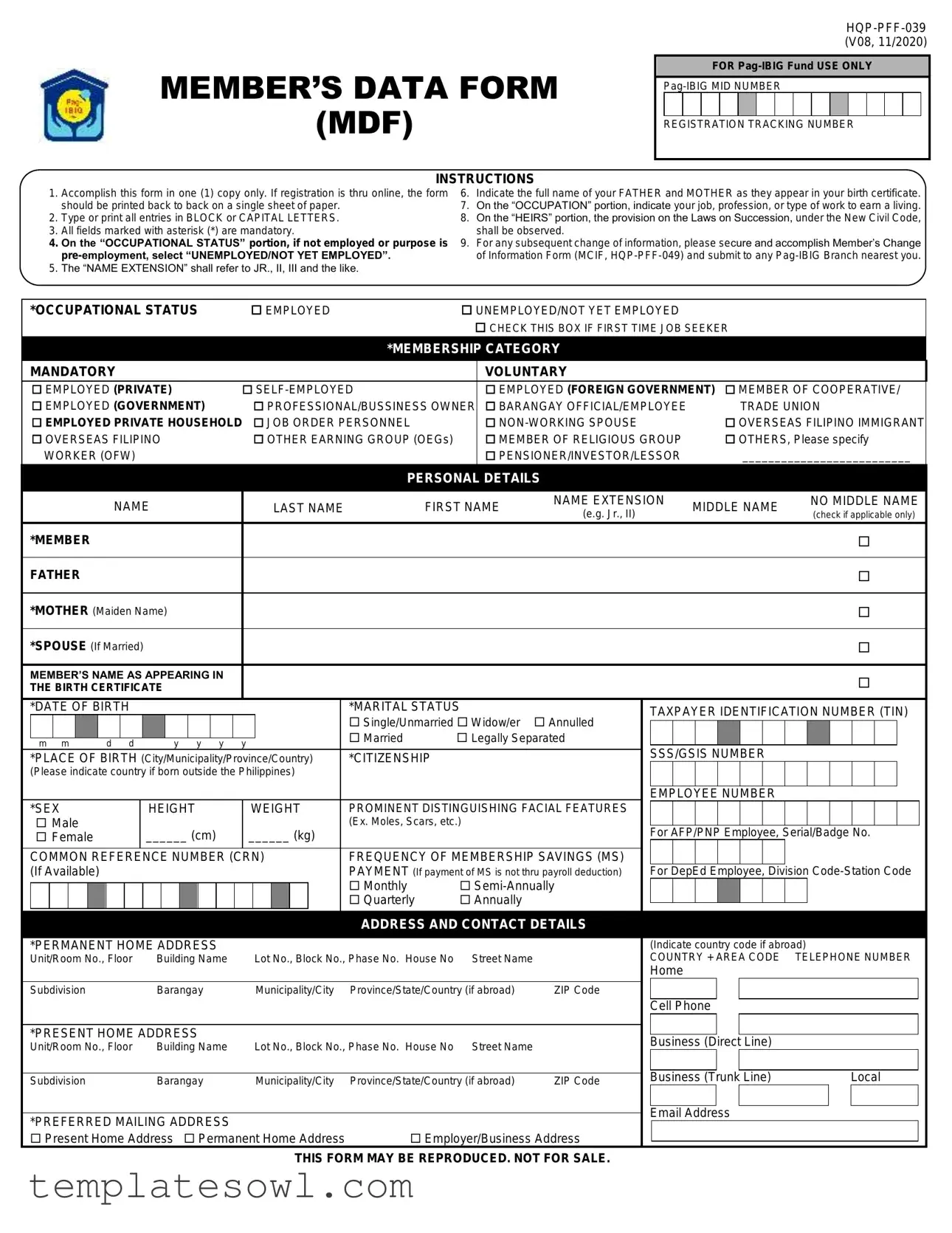
The Member Data MDF form is an essential document for individuals registering with the Pag-IBIG Fund, designed to capture crucial information necessary for effective membership administration. Filling out the form requires attention to detail, as it consists of various sections encompassing personal, occupational, and contact information. Key aspects include mandatory fields marked with an asterisk, such as the member's name, date of birth, and marital status, which must be completed accurately. The form also includes sections for occupational status, allowing members to specify their employment circumstances, which is relevant for determining their membership category—mandatory or voluntary. In addition, the MDF seeks to gather information about the member's family, including parents' names and heirs, which will influence the distribution of benefits under the rules of succession. The form must be completed in uppercase letters and submitted in a specific format, especially if registered online. It’s crucial to note that the form does not guarantee eligibility for Pag-IBIG’s loan programs; members must also fulfill additional requirements. As a foundational document for membership, the MDF facilitates access to a range of benefits and services provided by the Pag-IBIG Fund, supporting members in their financial endeavors.
Member Data Mdf Example
MEMBER’S DATA FORM (MDF)
INSTRUCTIONS
FOR
REGISTRATION TRACKING NUMBER
1.Accomplish this form in one (1) copy only. If registration is thru online, the form should be printed back to back on a single sheet of paper.
2.Type or print all entries in BLOCK or CAPITAL LETTERS.
3.All fields marked with asterisk (*) are mandatory.
4.On the “OCCUPATIONAL STATUS” portion, if not employed or purpose is
5.The “NAME EXTENSION” shall refer to JR., II, III and the like.
6.Indicate the full name of your FATHER and MOTHER as they appear in your birth certificate.
7.On the “OCCUPATION” portion, indicate your job, profession, or type of work to earn a living.
8.On the “HEIRS” portion, the provision on the Laws on Succession, under the New Civil Code, shall be observed.
9.For any subsequent change of information, please secure and accomplish Member’s Change of Information Form (MCIF,
|
*OCCUPATIONAL STATUS |
|
EMPLOYED |
|
UNEMPLOYED/NOT YET EMPLOYED |
|
|
|
|
|
|
|
|
|
|
|
|
|||||||||||||||||||||||||||
|
|
|
|
|
|
|
|
|
|
|
|
|
|
|
|
|
|
|
|
|
|
|
|
|
|
|
CHECK THIS BOX IF FIRST TIME JOB SEEKER |
|
|
|
|
|
|
|
||||||||||
|
|
|
|
|
|
|
|
|
|
|
|
|
|
|
|
|
|
|
|
|
|
|
|
|
|
*MEMBERSHIP CATEGORY |
|
|
|
|
|
|
|
|
|
|
|
|
|
|
||||
|
|
|
|
|
|
|
|
|
|
|
|
|
|
|
|
|
|
|
|
|
|
|
|
|
|
|
|
|
|
|
|
|
|
|
|
|
|
|
|
|
|
|
|
|
|
MANDATORY |
|
|
|
|
|
|
|
|
|
|
|
|
|
|
|
|
|
VOLUNTARY |
|
|
|
|
|
|
|
|
|
|
|
|
|
|
|||||||||||
|
|
|
|
|
|
|
|
|
|
|
|
|
|
|
|
|
|
|
|
|
|
|
|
|
|
|
|
|
|
|
|
|
|
|
|
|
|
|
|
|
|
|||
|
EMPLOYED (PRIVATE) |
|
|
|
EMPLOYED (FOREIGN GOVERNMENT) |
MEMBER OF COOPERATIVE/ |
||||||||||||||||||||||||||||||||||||||
|
EMPLOYED (GOVERNMENT) |
|
|
PROFESSIONAL/BUSSINESS OWNER |
BARANGAY OFFICIAL/EMPLOYEE |
|
|
|
TRADE UNION |
|||||||||||||||||||||||||||||||||||
|
EMPLOYED PRIVATE HOUSEHOLD JOB ORDER PERSONNEL |
|
|
|
|
|
|
OVERSEAS FILIPINO IMMIGRANT |
||||||||||||||||||||||||||||||||||||
|
OVERSEAS FILIPINO |
|
|
OTHER EARNING GROUP (OEGs) |
|
MEMBER OF RELIGIOUS GROUP |
|
|
OTHERS, Please specify |
|||||||||||||||||||||||||||||||||||
|
WORKER (OFW) |
|
|
|
|
|
|
|
|
|
|
|
|
|
|
|
|
|
PENSIONER/INVESTOR/LESSOR |
|
|
__________________________ |
|
|||||||||||||||||||||
|
|
|
|
|
|
|
|
|
|
|
|
|
|
|
|
|
|
|
|
|
|
|
|
|
|
PERSONAL DETAILS |
|
|
|
|
|
|
|
|
|
|
|
|
|
|
||||
|
|
|
|
|
|
|
|
|
|
|
|
|
|
|
|
|
|
|
|
|
|
|
|
|
|
|
|
|
|
|
|
|
|
|
|
|
|
|
|
|
|
|
|
|
|
|
|
|
|
|
|
|
NAME |
|
|
|
LAST NAME |
FIRST NAME |
NAME EXTENSION |
MIDDLE NAME |
|
NO MIDDLE NAME |
|||||||||||||||||||||||||||
|
|
|
|
|
|
|
|
|
|
|
(e.g. Jr., II) |
|
|
|
(check if applicable only) |
|||||||||||||||||||||||||||||
|
|
|
|
|
|
|
|
|
|
|
|
|
|
|
|
|
|
|
|
|
|
|
|
|
|
|
|
|
|
|
|
|
|
|
|
|
||||||||
|
|
|
|
|
|
|
|
|
|
|
|
|
|
|
|
|
|
|
|
|
|
|
|
|
|
|
|
|
|
|
|
|
|
|
|
|
|
|
|
|
|
|
|
|
|
*MEMBER |
|
|
|
|
|
|
|
|
|
|
|
|
|
|
|
|
|
|
|
|
|
|
|
|
|
|
|
|
|
|
|
|
|
|
|||||||||
|
|
|
|
|
|
|
|
|
|
|
|
|
|
|
|
|
|
|
|
|
|
|
|
|
|
|
|
|
|
|
|
|
|
|
|
|
|
|
|
|
|
|
|
|
|
FATHER |
|
|
|
|
|
|
|
|
|
|
|
|
|
|
|
|
|
|
|
|
|
|
|
|
|
|
|
|
|
|
|
|
|
|
|||||||||
|
|
|
|
|
|
|
|
|
|
|
|
|
|
|
|
|
|
|
|
|
|
|
|
|
|
|
|
|
|
|
|
|
|
|
|
|
|
|
|
|
|
|
|
|
|
*MOTHER (Maiden Name) |
|
|
|
|
|
|
|
|
|
|
|
|
|
|
|
|
|
|
|
|
|
|
|
||||||||||||||||||||
|
|
|
|
|
|
|
|
|
|
|
|
|
|
|
|
|
|
|
|
|
|
|
|
|
|
|
|
|
|
|
|
|
|
|
|
|
|
|
|
|
|
|
|
|
|
*SPOUSE (If Married) |
|
|
|
|
|
|
|
|
|
|
|
|
|
|
|
|
|
|
|
|
|
|
|
|
|
|
|
|
|
|
|
||||||||||||
|
|
|
|
|
|
|
|
|
|
|
|
|
|
|
|
|
|
|
|
|
|
|
|
|
|
|
|
|
|
|
|
|
|
|
|
|
|
|
|
|
|
|
|
|
|
MEMBER’S NAME AS APPEARING IN |
|
|
|
|
|
|
|
|
|
|
|
|
|
|
|
|
|
|
|
|
|
|
|
||||||||||||||||||||
|
THE BIRTH CERTIFICATE |
|
|
|
|
|
|
|
|
|
|
|
|
|
|
|
|
|
|
|
|
|
|
|||||||||||||||||||||
|
|
|
|
|
|
|
|
|
|
|
|
|
|
|
|
|
|
|
|
|
|
|
|
|
|
|
||||||||||||||||||
|
|
|
|
|
|
|
|
|
|
|
|
|
|
|
|
|
|
|
|
|
|
|
|
|
|
|
|
|
|
|
|
|
|
|
|
|
|
|
||||||
|
*DATE OF BIRTH |
|
|
|
|
|
|
|
|
|
|
|
|
|
|
|
*MARITAL STATUS |
|
|
TAXPAYER IDENTIFICATION NUMBER (TIN) |
||||||||||||||||||||||||
|
|
|
|
|
|
|
|
|
|
|
|
|
|
|
|
|
|
|
|
|
|
|
|
|
|
Single/Unmarried Widow/er |
Annulled |
|
|
|
|
|
|
|
|
|
|
|
|
|
|
|
||
|
|
|
|
|
|
|
|
|
|
|
|
|
|
|
|
|
|
|
|
|
|
|
|
|
|
|
|
|
|
|
|
|
|
|
|
|
|
|
|
|||||
|
|
|
|
|
|
|
|
|
|
|
|
|
|
|
|
|
|
|
|
|
|
|
|
|
|
Married |
Legally Separated |
|
|
|
|
|
|
|
|
|
|
|
|
|
|
|
||
|
m m |
d d |
|
|
y y y |
|
y |
|
|
|
|
|
|
|
|
|
|
|
|
|
|
|
||||||||||||||||||||||
|
|
|
|
|
|
|
|
|
|
SSS/GSIS NUMBER |
|
|
|
|
|
|
|
|||||||||||||||||||||||||||
|
*PLACE OF BIRTH (City/Municipality/Province/Country) |
|
*CITIZENSHIP |
|
|
|
|
|
|
|
|
|
|
|
||||||||||||||||||||||||||||||
|
(Please indicate country if born outside the Philippines) |
|
|
|
|
|
|
|
|
|
|
|
|
|
|
|
|
|
|
|
|
|||||||||||||||||||||||
|
|
|
|
|
|
|
|
|
|
|
|
|
|
|
|
|
|
|
|
|
|
|
|
|
|
|
|
|
|
|
|
|
|
|
|
|
|
|
|
|
|
|
|
|
|
|
|
|
|
|
|
|
|
|
|
|
|
|
|
|
|
|
|
|
|
|
|
|
|
|
|
|
|
|
|
EMPLOYEE NUMBER |
|
|
|
|
|
|
|
||||||
|
*SEX |
|
|
|
HEIGHT |
|
WEIGHT |
|
PROMINENT DISTINGUISHING FACIAL FEATURES |
|
|
|
|
|
|
|
|
|
|
|
|
|
|
|
||||||||||||||||||||
|
Male |
|
|
|
|
|
|
|
|
|
|
|
|
|
|
|
|
|
|
(Ex. Moles, Scars, etc.) |
|
|
|
|
|
|
|
|
|
|
|
|
|
|
|
|
||||||||
|
|
|
|
______ (cm) |
|
______ (kg) |
|
|
|
For AFP/PNP Employee, Serial/Badge No. |
||||||||||||||||||||||||||||||||||
|
Female |
|
|
|
|
|
|
|
|
|
|
|||||||||||||||||||||||||||||||||
|
|
|
|
|
|
|
|
|
|
|
|
|
|
|
|
|
|
|
|
|
|
|
||||||||||||||||||||||
|
COMMON REFERENCE NUMBER (CRN) |
|
FREQUENCY OF MEMBERSHIP SAVINGS (MS) |
|
|
|
|
|
|
|
|
|
|
|
|
|
|
|
||||||||||||||||||||||||||
|
(If Available) |
|
|
|
|
|
|
|
|
|
|
|
|
|
|
|
|
|
|
PAYMENT (If payment of MS is not thru payroll deduction) |
|
For DepEd Employee, Division |
||||||||||||||||||||||
|
|
|
|
|
|
|
|
|
|
|
|
|
|
|
|
|
|
|
|
|
|
|
|
|
|
Monthly |
|
|
|
|
|
|
|
|
|
|
|
|
|
|
|
|
||
|
|
|
|
|
|
|
|
|
|
|
|
|
|
|
|
|
|
|
|
|
|
|
|
|
|
|
|
|
|
|
|
|
|
|
|
|
|
|
|
|||||
|
|
|
|
|
|
|
|
|
|
|
|
|
|
|
|
|
|
|
|
|
|
|
|
|
|
Quarterly |
Annually |
|
|
|
|
|
|
|
|
|
|
|
|
|
|
|
|
|
|
|
|
|
|
|
|
|
|
|
|
|
|
|
|
|
|
|
|
|
|
|
|
|
|
|
|
|
|
|
|
|
|
|
|
|
|
|
|
|
|
|
|||
|
|
|
|
|
|
|
|
|
|
|
|
|
|
|
|
|
|
|
|
|
|
|
|
|
|
ADDRESS AND CONTACT DETAILS |
|
|
|
|
|
|
|
|
|
|
|
|
|
|
||||
|
|
|
|
|
|
|
|
|
|
|
|
|
|
|
|
|
|
|
|
|||||||||||||||||||||||||
|
*PERMANENT HOME ADDRESS |
|
|
|
|
|
|
|
|
|
|
|
|
(Indicate country code if abroad) |
||||||||||||||||||||||||||||||
|
Unit/Room No., Floor |
|
Building Name |
|
|
Lot No., Block No., Phase No. House No |
Street Name |
|
|
COUNTRY + AREA CODE |
TELEPHONE NUMBER |
|||||||||||||||||||||||||||||||||
|
|
|
|
|
|
|
|
|
|
|
|
|
|
|
|
|
|
|
|
|
|
|
|
|
|
|
|
|
|
|
Home |
|
|
|
|
|
|
|
|
|
|
|
|
|
|
Subdivision |
|
|
|
|
Barangay |
|
|
Municipality/City |
Province/State/Country (if abroad) |
ZIP Code |
|
|
|
|
|
|
|
|
|
|
|
|
|
|
|
||||||||||||||||||
|
|
|
|
|
|
|
|
|
|
|
|
|
|
|
|
|
|
|
|
|
|
|
|
|
|
|
|
|
|
|
|
|
|
|
|
|
|
|
|
|
|
|||
|
|
|
|
|
|
|
|
|
|
|
|
|
|
|
|
|
|
|
|
|
|
|
|
|
|
|
|
|
|
|
Cell Phone |
|
|
|
|
|
|
|
|
|
|
|||
|
|
|
|
|
|
|
|
|
|
|
|
|
|
|
|
|
|
|
|
|
|
|
|
|
|
|
|
|||||||||||||||||
|
*PRESENT HOME ADDRESS |
|
|
|
|
|
|
|
|
|
|
|
|
|
|
|
|
|
|
|
|
|
|
|
|
|
|
|||||||||||||||||
|
|
|
|
|
|
|
|
|
|
|
|
|
Business (Direct Line) |
|
|
|
|
|
|
|
||||||||||||||||||||||||
|
Unit/Room No., Floor |
|
Building Name |
|
|
Lot No., Block No., Phase No. House No |
Street Name |
|
|
|
|
|
|
|
|
|
||||||||||||||||||||||||||||
|
|
|
|
|
|
|
|
|
|
|
|
|
|
|
|
|
|
|
|
|
||||||||||||||||||||||||
|
|
|
|
|
|
|
|
|
|
|
|
|
Business (Trunk Line) |
|
|
|
Local |
|||||||||||||||||||||||||||
|
Subdivision |
|
|
|
|
Barangay |
|
|
Municipality/City |
Province/State/Country (if abroad) |
ZIP Code |
|
|
|
|
|||||||||||||||||||||||||||||
|
|
|
|
|
|
|
|
|
|
|
|
|
|
|
|
|
|
|
|
|
|
|
|
|
|
|
|
|
|
|
|
|
|
|
|
|
|
|
|
|
||||
|
|
|
|
|
|
|
|
|
|
|
|
|
|
|
|
|
|
|
|
|
|
|
|
|
|
|
|
|
|
|
Email Address |
|
|
|
|
|
|
|
||||||
|
*PREFERRED MAILING ADDRESS |
|
|
|
|
|
|
|
|
|
|
|
|
|
|
|
|
|
|
|
||||||||||||||||||||||||
|
|
|
|
|
|
|
|
|
|
|
|
|
|
|
|
|
|
|
|
|
|
|
|
|
|
|
||||||||||||||||||
|
Present Home Address Permanent Home Address |
Employer/Business Address |
|
|
|
|
|
|
|
|
|
|
|
|
|
|
|
|||||||||||||||||||||||||||
|
|
|
|
|
|
|
|
|
|
|
|
|
|
|
||||||||||||||||||||||||||||||
THIS FORM MAY BE REPRODUCED. NOT FOR SALE.
|
|
|
|
|
|
|
|
|
|
|
|
|
|
|
|
|
|
|
|
||||||
|
|
|
|
|
|
|
|
|
|
|
|
|
|
|
|
|
|
|
|
(V08, 11/2020) |
|||||
|
|
|
|
|
|
|
|
|
|
|
|
|
|
|
|
|
|
|
|
|
|
||||
|
PRESENT EMPLOYMENT DETAILS (If with more than one (1) employer, use separate sheet and follow format below) |
|
|
|
|
|
|
||||||||||||||||||
|
|
|
|
|
|
|
|
|
|
|
|
|
|
|
|
|
|
|
|
|
|
|
|
||
|
*OCCUPATION |
|
EMPLOYMENT STATUS |
|
TYPE OF WORK (For OFW only) |
|
|
|
|
|
|
||||||||||||||
|
|
|
Permanent/Regular Contractual |
|
|
|
|
|
|
(Pls. specify country of assignment) |
|||||||||||||||
|
|
|
|
__________________________ |
|
||||||||||||||||||||
|
|
|
Casual |
|
Temporary |
|
|||||||||||||||||||
|
|
|
|
__________________________ |
|
||||||||||||||||||||
|
|
|
|
|
|
|
|
|
|||||||||||||||||
|
*EMPLOYER/BUSINESS NAME |
|
|
|
|
|
|
MONTHLY INCOME |
|
|
|
|
|
|
|||||||||||
|
|
|
|
|
|
|
|
|
|
|
|
|
|
||||||||||||
|
|
|
|
|
|
|
|
Basic |
|
|
|
|
|
|
|
|
|
|
|
|
|
|
|
||
|
|
|
|
|
|
|
|
|
|
|
|
|
+ |
|
|
|
|
|
|
|
|
|
|
|
|
|
*EMPLOYER/BUSINESS ADDRESS |
|
|
|
|
Allowances/Others |
|
|
|
|
|
|
|||||||||||||
|
Unit/Room No., Floor |
Building Name |
Lot No., Block No., Phase No. House No. |
|
|
|
|
|
= |
|
|
|
|
|
|
|
|
|
|
|
|||||
|
|
|
|
|
|
|
|
Total Mo. Income |
|
|
|
|
|
|
|||||||||||
|
|
|
|
|
|
|
|
|
|
|
|
|
|
|
|
|
|
|
|
|
|
|
|
|
|
|
Street Name |
Subdivision |
Barangay |
|
OFFICE ASSIGNMENT |
|
|
|
|
|
|
||||||||||||||
|
|
|
|
|
|
|
|
Head Office |
|
Branch ____________ |
|||||||||||||||
|
Municipality/City |
Province |
State/Country (If abroad) |
ZIP Code |
DATE EMPLOYED (Month, Year) |
|
|
|
|
|
|
||||||||||||||
|
|
|
|
|
|
|
|
|
|
|
|
|
|
|
|
|
|
|
|
||||||
|
PREVIOUS EMPLOYMENT FROM DATE OF |
Pag |
|
|
|
|
|
|
|||||||||||||||||
|
|
|
|
|
|
|
|
|
|
|
|
|
|
|
|
|
|
|
|
|
|
|
|
|
|
|
EMPLOYER/BUSINESS NAME |
|
|
|
|
|
|
OFFICE ASSIGNMENT |
|
|
|
|
|
|
|||||||||||
|
|
|
|
|
|
|
|
Head Office |
|
Branch ____________ |
|||||||||||||||
|
EMPLOYER/BUSINESS ADDRESS |
|
|
|
|
|
|
|
FROM |
|
|
|
|
|
|
|
TO |
||||||||
|
|
|
|
|
|
|
|
|
|
|
|
|
|
|
|
|
|
|
|
|
|
||||
|
|
|
|
|
|
|
|
m m |
y y y y |
m m |
y y y y |
||||||||||||||
|
EMPLOYER/BUSINESS NAME |
|
|
|
|
|
|
OFFICE ASSIGNMENT |
|
|
|
|
|
|
|||||||||||
|
|
|
|
|
|
|
|
Head Office |
|
Branch ____________ |
|||||||||||||||
|
EMPLOYER/BUSINESS ADDRESS |
|
|
|
|
|
|
|
FROM |
|
|
|
|
|
|
|
TO |
||||||||
|
|
|
|
|
|
|
|
|
|
|
|
|
|
|
|
|
|
|
|
|
|
|
|
|
|
|
|
|
|
|
|
|
|
m m |
y y y y |
m m |
y y y y |
||||||||||||||
|
EMPLOYER/BUSINESS NAME |
|
|
|
|
|
|
OFFICE ASSIGNMENT |
|
|
|
|
|
|
|||||||||||
|
|
|
|
|
|
|
|
Head Office |
|
Branch ____________ |
|||||||||||||||
|
EMPLOYER/BUSINESS ADDRESS |
|
|
|
|
|
|
|
FROM |
|
|
|
|
|
|
|
TO |
||||||||
|
|
|
|
|
|
|
|
|
|
|
|
|
|
|
|
|
|
|
|
|
|
|
|
|
|
m m y y y y
m m y y y y
HEIRS (In case of death, Fund benefits shall be divided among the member’s heirs in accordance with the Rules of Succession under the New Civil Code, as amended) (Use another sheet if necessary)
LAST NAME |
FIRST NAME |
NAME |
MIDDLE NAME |
NO MIDDLE NAME |
RELATIONSHIP |
|
|
|
|
DATE OF BIRTH |
|
|
|
|||||
EXTENSION |
(Check only if applicable) |
|
|
|
|
|
|
|||||||||||
|
|
|
|
|
|
|
|
|
|
|
|
|
|
|
|
|
||
|
|
|
|
|
|
|
|
|
|
|
|
|
|
|
|
|
|
|
|
|
|
|
|
|
|
|
|
|
|
|
|
|
|
|
|
|
|
|
|
|
|
|
|
|
m |
m |
|
|
d |
d |
|
y |
y |
y |
y |
|
|
|
|
|
|
|
|
|
|
|
|
|
|
|
|
|
|
|
|
|
|
|
|
|
|
|
m |
m |
|
|
d |
d |
|
y |
y |
y |
y |
|
|
|
|
|
|
|
|
|
|
|
|
|
|
|
|
|
|
|
|
|
|
|
|
|
|
|
m |
m |
|
|
d |
d |
|
y |
y |
y |
y |
|
|
|
|
|
|
|
|
|
|
|
|
|
|
|
|
|
|
|
|
|
|
|
|
|
|
|
m |
m |
|
|
d |
d |
|
y |
y |
y |
y |
|
CERTIFICATION
I hereby certify that the information given, and all statements made herein are true and correct. Likewise, I hereby authorize
______________________________________ |
_________________ |
SIGNATURE OF INFORMANT |
DATE |
FOR
RECEIVED BY |
|
|
_________________________________ |
________________________ |
____________________ |
Signature over Printed Name |
Designation/Position |
Branch/Unit |
DATE
DISCLAIMER
Membership registration with the Fund does not automatically qualify a
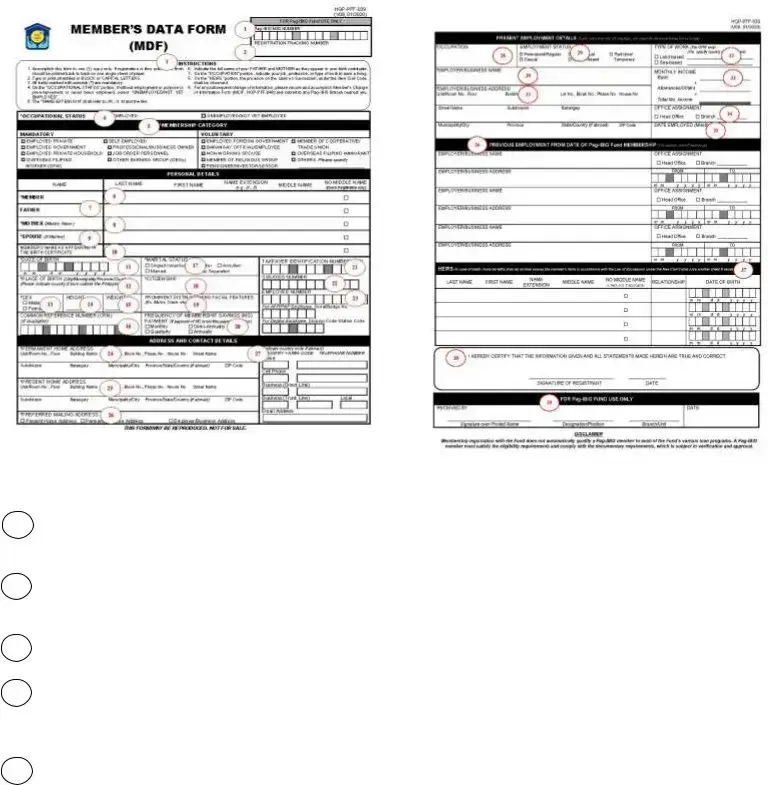
ANNEX A
GUIDE IN ACCOMPLISHING MEMBER’S DATA FORM (MDF)
FRONT
Submit MDF in one (1) copy and observe the following:
1
2Registration Tracking Number (RTN) - refers to
3Instructions - refers to quick guide in accomplishing the MDF.
4Occupational Status - check the appropriate box to indicate working status of a person either employed, unemployed or not yet employed (for first time job seeker).
5Membership Category - check the appropriate box to indicate type of membership coverage as defined under R.A. 9679.
BACK
Mandatory Coverage
a.Employed (Private) - any person in service of a private employer and who receives compensation for such services rendered, may or may not be registered yet with the Social Security System (SSS); will also include the following:
-Employees of
b.Employed (Government) - any person in service of any of the government offices that are coverable by the GSIS; will also include the following:
-Uniformed personnel of the Armed Forces of the Philippines, Philippine National Police, Bureau of Fire Protection, Bureau of Jail Management and Penology
-Members of the Judiciary and Constitutional Commissions

c.Overseas Filipino Worker (OFW) - any person working for a
d.
Professional/Business Owner - refers to individual that earns income through conducting profitable operations from a trade or business that he operates directly.
Job Order Personnel - refers to hired workers for a piece of work or intermittent job of short duration not exceeding six (6) months and is paid on a daily or hourly basis and has no
Other Earning Group (OEGs) - this refers to small scale units engaged in the production of goods and services with the primary objective of generating employment and income to the person concerned in order to earn a living.
-Public Utility Transport Driver
-Market Vendor
-Farmer
-Fisher Folk
-Others (Other similar
Voluntary Coverage
a.Employed (Foreign Government) - refers to
employee of foreign government
(embassies/consulates) or international organizations without an administrative agreement with the Fund.
b.Barangay Official/Employee - refers to any person in authority in their jurisdictions, or who may be designated by law or ordinance and charged with the maintenance of public order, protection and security of life and property, or the maintenance of a desirable and balanced environment, or who comes to the aid of persons in authority.
c.
d.Member of Religious Group - refers to individual, head or leader of any organization in the exercise of religious belief.
e. Pensioner - any person receiving
Investor - the owner of investor securities or investor share where investor securities or shares mean shares of stock issued by a Real Estate Investment Trust (REIT) or derivatives thereof; or
Lessor - shall include the owner or administrator or agent of the owner of the residential unit.
f. Member of Cooperative - a member of an autonomous and duly registered association of persons, with a common bond of interest, who have voluntarily joined together to achieve their social, economic, and cultural needs and aspirations by making equitable contributions to the capital required, patronizing their products and services and accepting a fair share of the risks and benefits of the undertaking in accordance with the universally accepted cooperative principles; or
Member of Trade Union - a member of an organization whose membership consists of workers and union leaders, united to protect and promote their common interest.
g.Overseas Filipino Immigrant - refers to a person of Filipino origin who lives out of the Philippines as citizen or as permanent resident of a different country.
6Member’s Name - this portion shall be accomplished in the following order:
Last Name - refers to the family name or surname.
First Name - refers to the given name.
Name Extension - refers to Jr., II, III and the like.
Middle Name - refers to registrant’s mother’s maiden last name or for married women, refers to father’s last name.
No Middle Name - this portion shall be checked if informant is not using a middle name, such as the Chinese.
7 |
Father’s Name |
Please refer to item |
|
|
|
8 |
Mother’s Name (Maiden Name) |
no. 6 in accomplishing |
Last Name, First |
||
|
|
Name, Name |
9 |
Spouse’ Name |
Extension, and Middle |
|
|
Name |
10Member’s Name as Appearing in the Birth Certificate
- indicate Member’s name based on Birth Certificate.
11Date of Birth - indicate date of birth in the following format: mm/dd/yyyy
Example: If born on January 14, 1980, please write 01 14 1980.

12 Place of Birth - indicate the City/Municipality/ Province/Country where the registrant was born. Specify only the country if born outside the Philippines.
13Sex - check the appropriate box.
14Height - indicate height in centimeters (cm). Conversion: 1 foot = 30.48 cm
1 inch = 2.54 cm
Example: 5’3” = 160.02 cm
15Weight - indicate weight in kilograms (kg). Conversion: 1 pound (lb) = 0.4536 kilogram Example: 120 lbs = 54.43 kg
16Common Reference Number (CRN) - indicate if available.
17Marital Status - check the appropriate box.
18Citizenship - indicate your nationality.
19Prominent Distinguishing Facial Features - indicate your distinguishing features that can be found on the face such as “mole under the right eye” or “mole or birth mark on the left cheek/forehead”.
20Frequency of Membership Savings (MS) Payment - check appropriate box if payment of MS is not thru payroll deduction.
21Taxpayer Identification Number (TIN) - indicate your
22SSS/GSIS Number - for private employees, indicate your
23Employee Number - refers to your company ID number.
For AFP/PNP Employee, indicate Serial/Badge No.
For DepEd Employee, aside from Employee Number, indicate Division
24Permanent Home Address - indicate the address of your permanent residence.
25Present Home Address - indicate the address where you currently reside, and the state/country only if present address is outside the Philippines.
26Preferred Mailing Address - check the appropriate box to indicate your chosen address to receive mail.
27Contact Numbers - indicate the country and area code only if outside Metro Manila or based abroad.
28Occupation - indicate your job, profession, or type of work to earn a living.
For Other Working Group (OWG)/Informal Sector, select from the following:
-Public Utility Transport Driver
-Market Vendor
-Farmer
-Fisher Folk
-Others (Other workers in the informal sector)
29Employment Status - check the appropriate box.
30Employer/Business Name - indicate complete Employer/Business Name appearing in the registration certificate or employment contract (applicable for Formally Employed, OFW and
31Employer/Business Address - indicate complete Employer/Business Address appearing in the registration certificate or employment contract (applicable for Formally Employed, OFW and Self- employed Professional/Business Owner).
32Type of Work - check the appropriate box (applicable for OFW only).
33Monthly Income - indicate your income or earning per month.
34Office Assignment - check the appropriate box to indicate whether assigned to Head Office or a particular Branch.
35Date Employed - indicate inclusive date of employment under current employer.
36Previous Employment From Date of
37Heirs - indicate your legal heir/s in accordance with the Laws of Succession, as provided in the New Civil Code of the Philippines, as amended.
38Certification - affix your signature and indicate the date when the MDF was accomplished.
39Acknowledgement - to be accomplished by
Form Characteristics
| Fact Name | Details |
|---|---|
| Form Purpose | The Member Data Form (MDF) is designed for Pag-IBIG Fund members to provide personal and occupational information necessary for membership registration and benefits. |
| Mandatory Fields | The MDF includes mandatory fields marked with an asterisk (*), such as name, date of birth, and marital status, which must be completed for valid registration. |
| Occupational Status | Members must indicate their occupational status, which includes options like employed, unemployed, or first-time job seeker, to determine their eligibility for specific benefits. |
| Governing Law | The MDF operates under the New Civil Code of the Philippines, which governs laws pertaining to succession and member benefits. |
Guidelines on Utilizing Member Data Mdf
Filling out the Member Data MDF form is a straightforward process, but it requires careful attention to detail. Ensuring that all information is accurate and complete is crucial, as specific details will determine your eligibility and processing for the Pag-IBIG Fund. Here's a step-by-step guide to help you complete the form efficiently.
- Obtain a single copy of the Member Data MDF form, either printed online back-to-back or on a physical copy.
- Use BLOCK or CAPITAL LETTERS to complete all fields clearly.
- Identify and fill in fields marked with an asterisk (*), as these are mandatory.
- In the “OCCUPATIONAL STATUS” section, select “UNEMPLOYED/NOT YET EMPLOYED” if you are not currently employed or if you are a first-time job seeker.
- Provide your name with the proper extensions (e.g., JR., II, III) if applicable.
- List the full names of your FATHER and MOTHER as they appear on your birth certificate.
- State your occupation, which should reflect your current work or means of livelihood.
- Specify the heirs in the designated section, following the Rules of Succession under the New Civil Code.
- If there are any changes to your information in the future, be prepared to fill out and submit the Member’s Change of Information Form (MCIF).
- Complete the personal details sections, including date of birth, marital status, TIN, sex, height, and weight.
- Provide your permanent and present addresses, ensuring to include country codes and contact numbers if applicable.
- Fill out the present employment details, indicating your employer's name, address, monthly income, and employment status.
- Record details of any previous employments if necessary, making sure to include the dates of your Pag-IBIG membership.
- Carefully list your heirs with their relevant details such as name, relationship, and date of birth.
- Sign the certification section, affirming that all provided information is accurate, and indicate the date of signature.
What You Should Know About This Form
What is the Member Data MDF form and why is it needed?
The Member Data MDF form is an essential document required for individuals seeking to register with the Pag-IBIG Fund. This form collects vital personal information, such as your name, occupation, and other relevant details. It is needed to establish your membership in the Fund, which enables you to access various benefits, including loan programs and savings options.
How do I fill out the Member Data MDF form correctly?
To complete the form accurately, use BLOCK or CAPITAL LETTERS. You must accomplish one copy of the form. If registering online, ensure to print it back to back on a single sheet of paper. Be attentive to the fields marked with an asterisk (*); these are mandatory entries. Take your time to provide the full names of your parents as they appear on your birth certificate and check the appropriate boxes for your occupational status and membership category.
What should I do if I make a mistake on the form?
If you notice an error after filling out the form, do not simply cross it out. Instead, complete a new Member Data MDF form to ensure your information is accurate. Accuracy is crucial because the details provided affect your eligibility for various benefits. After submitting the corrected form, remember to save a copy for your records.
What personal information is required in the form?
The form requires several personal details, including your full name, date of birth, marital status, citizenship, place of birth, and contact information. Additionally, you will need to provide information about your parents, occupation, employment status, and a preferred mailing address. Your taxpayer identification number and other identifiers, such as SSS or GSIS numbers, may also be necessary.
What if I am not currently employed? Can I still submit the form?
Yes, you can still submit the form if you are not currently employed. Simply check the option indicating your occupational status as “UNEMPLOYED/NOT YET EMPLOYED.” If you are a first-time job seeker, you can check the corresponding box for that status. Your participation is vital, and Pag-IBIG Fund welcomes all individuals, regardless of their current employment situation.
How can I change the information submitted after I have registered?
If you need to change any of your information after submitting the Member Data MDF form, you must complete the Member’s Change of Information Form (MCIF) and submit it to your nearest Pag-IBIG branch. It’s important to keep your details updated to ensure you continue to receive the benefits you are entitled to.
Is my personal information collected by the Pag-IBIG Fund secure?
Your personal information is indeed secure. By signing the certification on the form, you allow Pag-IBIG Fund to collect and manage your data responsibly. The Fund adheres to the provisions of the Data Privacy Act, which ensures your data is protected, and you have the right to access and rectify your information at any time.
What should I do if I have more questions about the form?
If you have additional questions or need assistance filling out the Member Data MDF form, do not hesitate to reach out to your local Pag-IBIG Fund branch. The staff can provide guidance and support to ensure you complete the form correctly and understand the benefits available to you.
Common mistakes
Filling out the Member Data MDF form can seem straightforward, but many individuals make common mistakes that can lead to delays or complications. One frequent error is failing to print the form back to back on a single sheet of paper when registering online. This requirement must be strictly followed to ensure proper processing.
Another common mistake involves not using block or capital letters throughout the form. This detail is crucial as it enhances legibility, allowing the information to be easily understood by the processing staff. Overlooking this step can result in the need for clarifications, potentially prolonging the registration process.
Additionally, individuals often neglect to complete all mandatory fields, which are clearly marked with an asterisk (*). Leaving these fields blank can lead to delays in processing the application, as incomplete forms typically cannot be processed further.
Another significant mistake is in the “Occupational Status” section. Some registrants incorrectly select options that do not accurately reflect their employment situation. It is essential to choose the correct employment status to avoid issues with eligibility for various programs offered by the Pag-IBIG Fund.
Some applicants also misinterpret the requirement for providing parental names. It is common for individuals to abbreviate or omit their parents’ names, not realizing that full names as they appear on the birth certificate must be provided. This specific requirement cannot be ignored, as it is vital for identification purposes.
Furthermore, confusion often arises regarding the “Occupation” portion of the form. It is important for applicants to specify their precise job roles or professions. Vague descriptions can complicate the evaluation process. Using clear and specific terminology helps ensure that the information is accurate and complete.
Many individuals also fail to indicate the correct marital status. It can be tempting to choose the option that seems most relevant, but this can lead to significant complications later, especially regarding benefits and eligibility for various services.
Finally, a common error involves not certifying the information accurately. Signifying that all information is true and correct is not merely a formality; it serves as a legal acknowledgment that the applicant is providing accurate data. Neglecting to do so can result in serious repercussions and rejection of the application.
Documents used along the form
When applying for membership with the Pag-IBIG Fund, the Member Data MDF form is a fundamental document. However, there are additional forms and documents that are often required to ensure proper processing and compliance with requirements. Below are five of these documents, each playing a crucial role in the membership application process.
- Member’s Change of Information Form (MCIF) - This form is necessary for any updates or corrections to the personal information originally submitted. Members must submit the MCIF to reflect changes such as a new address, marital status, or other relevant details that may affect their membership.
- Pag-IBIG Membership ID (MID) Application - This document serves as a request for the issuance of a unique membership identification number. The MID is essential for easy tracking of a member's contributions and for accessing various services offered by the Pag-IBIG Fund.
- Certificate of Employment - A certificate that proves a member's employment status. This document may be required to validate the member’s occupational status as indicated on the Member Data MDF form, ensuring that the member qualifies for specific benefits under the Fund.
- Taxpayer Identification Number (TIN) Verification - This verification document confirms that the applicant’s TIN, as submitted on the MDF form, is valid. It's essential for ensuring that all financial contributions to the Fund are correctly accounted for and compliant with tax regulations.
- SSS/GSIS Number - If applicable, members must provide their Social Security System (SSS) or Government Service Insurance System (GSIS) number. This information helps link the member to existing social security benefits, ensuring that their contributions are recorded accurately.
In summary, alongside the Member Data MDF form, these additional documents collectively support a member's application and help uphold the integrity of the Pag-IBIG Fund's operations. Ensuring that all necessary paperwork is submitted is key to a smooth membership experience.
Similar forms
- Member’s Change of Information Form (MCIF): Similar in that both forms collect essential personal data of a member. The MCIF allows members to update their existing information, while the Member Data MDF form gathers initial membership details.
- Application for Pag-IBIG Fund Membership: This document serves a similar purpose, focusing on the initiation of membership within the Pag-IBIG Fund. Like the MDF form, it requires accurate personal details and verification of identity.
- Employer’s Certification Form: This document establishes the employment of the member and includes some overlapping employment details found in the MDF form. The MDF also reflects the individual’s occupational status and employer information.
- Loan Application Form: The loan application requires personal data and employment information similar to that gathered in the Member Data MDF form. However, it targets a specific financial service rather than general member registration.
- Beneficiary Designation Form: Both forms deal with the member’s personal information and, in particular, the designation of beneficiaries. The MDF form requests information about heirs, while the Beneficiary Form specifies recipients of financial benefits.
- Data Privacy Consent Form: Both forms include legal consent related to data collection and processing. The MDF form emphasizes member details, while the Data Privacy Consent ensures the member understands how their information is used.
- Tax Identification Number Form: This is similar because both documents ask for a TIN and other identification details to verify the individual's status. Accurate TIN reporting is fundamental for membership, as noted on the MDF form.
- Social Security System (SSS) Membership Form: This form shares similarities with the MDF in that it collects information for member verification and records keeping. Each ensures accurate identification for benefits.
- Health Insurance Enrollment Form: This document seeks vital personal and employment details. Both the MDF and health insurance forms focus on evaluating eligibility for benefits based on provided information.
- Retirement Savings Plan Enrollment Form: Similar in purpose to secure individual data for program qualification. Each requires personal, employment, and contact details to determine eligibility for respective benefits.
Dos and Don'ts
When completing the Member Data MDF form, it’s important to get it right the first time to avoid any delays in processing. Here are some tips on what to do and what to avoid:
- Do fill out the form in one copy, ensuring that it is printed back to back if registered online.
- Do use BLOCK or CAPITAL LETTERS for all entries to ensure clarity and legibility.
- Do double-check that all mandatory fields marked with an asterisk (*) are completed before submission.
- Do keep the information consistent and accurate, particularly names as they appear on official documents.
- Don't leave any mandatory fields blank—the form may be returned or delayed if incomplete.
- Don't use cursive or lowercase letters, as this can lead to misunderstandings or errors in your documentation.
- Don't forget to review your contact details; incorrect information could impact communication.
- Don't submit the form without signing and dating it; your personal affirmation is crucial for validity.
Filling out this form correctly can save you time and prevent potential headaches down the road. Take a moment to ensure you're following these guidelines!
Misconceptions
Misconception 1: The Member Data MDF form can be filled out multiple times.
This is incorrect. You should only accomplish the form in one copy. If you are registering online, the form needs to be printed back to back on a single sheet of paper.
Misconception 2: Only certain fields are mandatory on the form.
Actually, all fields marked with an asterisk (*) are mandatory. It is essential to complete these fields to avoid issues with the registration process.
Misconception 3: If unemployed, I don't need to fill out the occupational status section.
This is not true. Even if you are unemployed or seeking your first job, you must indicate your occupational status by selecting “UNEMPLOYED/NOT YET EMPLOYED.”
Misconception 4: My parents’ names can be listed however I choose.
It’s important to provide the full names of your father and mother as they appear on your birth certificate. This ensures consistency and accuracy in your records.
Misconception 5: Job titles are irrelevant in the occupation section.
The job title is actually significant. You are required to specify your job, profession, or the type of work you do to earn a living in the occupation section.
Misconception 6: It’s okay to leave out my heirs’ information on the form.
You should not leave out this information. The section about heirs is necessary because, in the event of death, benefits must be divided according to the Rules of Succession under the New Civil Code.
Misconception 7: Filling out the form guarantees access to loan programs.
It’s a common misunderstanding that submitting the MDF immediately qualifies you for the Fund’s loan programs. Membership alone does not guarantee access; eligibility and documentation requirements must still be met.
Misconception 8: There are no specific instructions for filling out the form.
In fact, the form comes with clear instructions that guide you through each section. Following them is crucial for successful completion and registration.
Key takeaways
Filling out the Member Data MDF form accurately is crucial. This ensures that all information provided is reliable and valid for registration purposes. Incorrect or incomplete entries may lead to delays or complications in accessing Pag-IBIG Fund benefits.
All mandatory fields need to be completed. Pay special attention to items marked with an asterisk (*). Missing information in these areas could result in your application being rejected or processed incorrectly.
Use clear and legible writing. Entries should be made in block or capital letters. This helps avoid misunderstandings and ensures that the data is correctly captured by the system. Consider typing the form if the option is available to enhance clarity.
Regularly update your information. If there are any changes after your initial submission—such as your address or occupational status—make sure to fill out the Member’s Change of Information Form (MCIF) and submit it to a nearby Pag-IBIG branch to keep your records up to date.
Browse Other Templates
What Do You Need to Change Your Address at the Dmv - The DMV will verify information against other governmental records.
Dmv Plate Surrender - Providing your new address on the form ensures you receive all communications from the DMV.