Fill Out Your Pa W2S Form
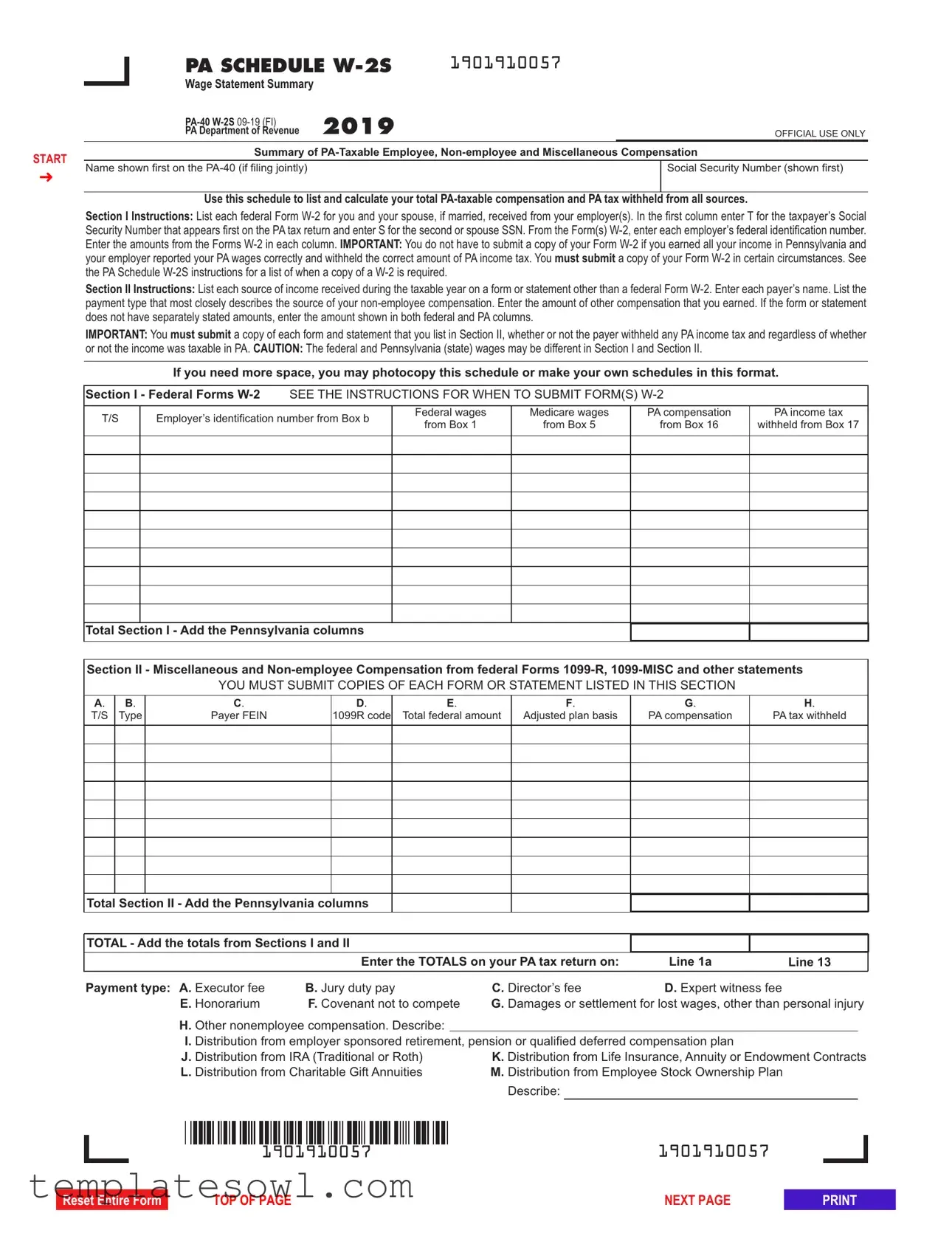
The PA W-2S form serves as a critical tool for Pennsylvania taxpayers to accurately report their income and ensure compliance with state tax regulations. This form, also known as the Wage Statement Summary, summarizes Pennsylvania-taxable compensation earned by both employees and non-employees throughout the year. Through its structured sections, the PA W-2S enables individuals to itemize their earnings as reported on federal Form W-2 and any other relevant income sources, such as 1099-MISC and 1099-R forms. Key components include a thorough entry of employer identification numbers, PA compensation amounts, and tax withholdings. It is essential to note that while taxpayers who earned all their income within Pennsylvania may not need to submit copies of their W-2 forms, certain exceptions exist that require additional documentation. These nuances in reporting—especially concerning changes in income or discrepancies between federal and state wages—highlight the necessity of careful completion. The form also informs investigators how to reconcile income with other compensation and outlines the correct submission protocols, reinforcing the importance of maintaining organized financial records. In light of recent updates, the instruction sections in the PA W-2S have evolved to clarify requirements, ensuring clearer communication between taxpayers and the Pennsylvania Department of Revenue. Understanding the intricacies of this form can significantly impact one's tax filing experience and compliance.
Pa W2S Example

START
➜
|
PA SCHEDULE |
1901910057 |
|
|
|
|
Wage Statement Summary |
2019 |
|
|
|
|
|
|
|
||
|
|
|
|
||
|
PA Department of Revenue |
|
|
OFFICIAL USE ONLY |
|
|
Summary of |
||||
|
|
|
|
|
|
Name shown first on the |
|
|
|
Social Security Number (shown first) |
|
|
|
|
|
|
|
Use this schedule to list and calculate your total
Section I Instructions: List each federal Form
Section II Instructions: List each source of income received during the taxable year on a form or statement other than a federal Form
IMPORTANT: You must submit a copy of each form and statement that you list in Section II, whether or not the payer withheld any PA income tax and regardless of whether
or not the income was taxable in PA. CAUTION: The federal and Pennsylvania (state) wages may be different in Section I and Section II.
If you need more space, you may photocopy this schedule or make your own schedules in this format.
Section I - Federal Forms
T/S |
Employer’s identification number from Box b |
Federal wages |
Medicare wages |
PA compensation |
PA income tax |
|
from Box 1 |
from Box 5 |
from Box 16 |
withheld from Box 17 |
|||
|
|
|||||
|
|
|
|
|
|
|
|
|
|
|
|
|
|
|
|
|
|
|
|
|
|
|
|
|
|
|
|
|
|
|
|
|
|
|
|
|
|
|
|
|
|
|
|
|
|
|
|
|
|
|
|
|
|
|
|
|
|
|
|
|
|
|
|
|
|
|
|
|
|
|
|
|
|
|
|
Total Section I - Add the Pennsylvania columns
Section II - Miscellaneous and
YOU MUST SUBMIT COPIES OF EACH FORM OR STATEMENT LISTED IN THIS SECTION
A. |
B. |
C. |
D. |
E. |
F. |
G. |
H. |
T/S |
Type |
Payer FEIN |
1099R code |
Total federal amount |
Adjusted plan basis |
PA compensation |
PA tax withheld |
|
|
|
|
|
|
|
|
|
|
|
|
|
|
|
|
|
|
|
|
|
|
|
|
|
|
|
|
|
|
|
|
|
|
|
|
|
|
|
|
|
|
|
|
|
|
|
|
|
|
|
|
|
|
|
|
|
|
|
|
|
|
|
|
|
|
|
|
|
|
|
|
|
|
|
|
|
|
|
|
Total Section II - Add the Pennsylvania columns
TOTAL - Add the totals from Sections I and II
|
Enter the TOTALS on your PA tax return on: |
Line 1a |
Line 13 |
||||
|
|
|
|
|
|
|
|
Payment type: A. Executor fee |
B. Jury duty pay |
C. Director’s fee |
D. Expert witness fee |
|
|
||
E. Honorarium |
F. Covenant not to compete |
G. Damages or settlement for lost wages, other than personal injury |
|||||
H. Other nonemployee compensation. Describe: |
|
|
|
|
|
|
|
I. Distribution from employer sponsored retirement, pension or qualified deferred compensation plan |
|
|
|||||
J. Distribution from IRA (Traditional or Roth) |
K. Distribution from Life Insurance, Annuity or Endowment Contracts |
||||||
L. Distribution from Charitable Gift Annuities |
M. Distribution from Employee Stock Ownership Plan |
|
|
||||
|
|
|
Describe: |
|
|
|
|
|
|
|
|
|
|
|
|
|
|
|
|
|
|
|
|
|
|
1901910057 |
1901910057 |
||||||||||||||||
Reset Entire Form
TOP OF PAGE |
NEXT PAGE |

Pennsylvania Department of Revenue 2019
Instructions for
Wage Statement Summary
WHAT’S NEW
The schedule was revised to divide the form into sections instead of parts to conform to a new department standard required as part of a computer system change. Two new segments of instructions have been added for “How to Sub- mit Form(s)
FORM INSTRUCTIONS
IDENTIFICATION INFORMATION
NAME OF TAXPAYER CLAIMING TAX FORGIVENESS
Enter the name of the taxpayer. If a jointly filed return, enter the name of the primary taxpayer (name shown first on the
SOCIAL SECURITY NUMBER
Enter the Social Security number (SSN) of the taxpayer. If a jointly filed return, enter the primary taxpayer’s SSN.
GENERAL INFORMATION
PURPOSE OF SCHEDULE
Use
Refer to the PA Personal Income Tax Guide – Gross Com- pensation section for additional information.
RECORDING DOLLAR AMOUNTS
Show money amounts in
GENERAL INSTRUCTIONS
SECTION I
Use Section I of
Legible photocopies of Form
WHO MUST COMPLETE
SECTION II
An amended PA Schedule
Use Section II of
www.revenue.pa.gov |
|
PREVIOUS PAGE |
NEXT PAGE |

HOW TO SUBMIT FORM(S)
PAPER FILED RETURNS
For paper filed
aphotocopy (8 ½ x 11 sheet) of the form(s)
For
●PDF file – attaching a PDF file of the documents to return when filed (if the software allows these attach- ments);
●Fax - using the
●Email – attaching a PDF file of the document(s) to an email to
●U.S. Postal Service - mailing the information to the de- partment at:
PA DEPARTMENT OF REVENUE
ELECTRONIC FILING SECTION
P.O. BOX 280507
HARRISBURG PA
LINE INSTRUCTIONS
SECTION I
List each federal Form
T/S
Enter a T to report the income from all Forms
EMPLOYER’S IDENTIFICATION NUMBER
Enter the federal employer identification number (FEIN) from Box B of the
FEDERAL WAGES
Enter the amount of federal wages from Box 1 of the
MEDICARE WAGES
Enter the amount of Medicare wages from Box 5 of the W- 2 for each employer.
PA COMPENSATION
Enter the Pennsylvania compensation from Box 16 of the
CAUTION: If Box 15 of the
sheet with the
PA INCOME TAX WITHHELD
Enter the amount of Pennsylvania income tax withheld from Box 17 of the
WHEN TO SUBMIT FORM(S)
The department does not require submission of a copy of Form
An actual state copy or a legible photocopy of each state copy of Form
1.The PA compensation entered on Line 1a of the
2.The employer provided a handwritten Form
3.The employer reported an incorrect amount on Form W- 2. A written statement from the employer must also be included.
4.The employer withheld PA income tax from wages at a rate that is more than the current year’s tax rate of 3.07 percent.
5.PA income tax was withheld by an employer for a resi- dent of a reciprocal compensation agreement state.
6.The Medicare wages in Box 5 on Form
7.A PA resident is working in another state or country and did not have PA income tax withheld by the employer.
8.A distribution from a nonqualified deferred compensa- tion plan is included in Box 1 of Form
9.Form
NOTE: If Form
2 |
www.revenue.pa.gov |
PREVIOUS PAGE |
NEXT PAGE |

compensation and tax withheld must be submitted by pro- viding pay stubs and a statement identifying the employer and the reason Form
See “How to Submit Form(s)
TOTAL SECTION I
Add the amounts of PA compensation and PA income tax withheld and enter the results.
SECTION II
List each source of income received during the taxable year on a form or statement other than a federal Form
IMPORTANT: A copy of each form and statement for amounts listed in Section II must be submitted with the
or not the income was taxable in PA.
See “When to Submit Form(s)
CAUTION: The federal and Pennsylvania (state) wages may be different in Section I and Section II.
COLUMN A
Enter a T if the payment or distribution was to the primary taxpayer shown first on the
COLUMN B
Enter the letter designation for the type of payment(s) from the following list:
●A Executor fee;
●B Jury duty pay;
●C Director’s fee;
●D Expert witness fee;
●E Honorarium;
●F Covenant not to compete;
●G Damages or settlement for lost wages other than per- sonal injury;
●H Other
●I Distribution from employer sponsored retirement, pension, or qualified deferred compensation plan;
●J Distribution from IRA (Traditional or Roth);
●K Distribution from life insurance, annuity or endow- ment contracts;
●L Distribution from charitable gift annuities; and/or
●M Distribution from employee stock ownership plan (enter description in space provided).
NOTES: If the type of payment listed on Form 1099-  R is not known, contact the payer for more information regarding the distribution to properly report the type of pay- ment. For distributions from an IRA, the box next to Box 7 on the
2P.
COLUMN C
Enter the payers’ federal employer identification number (FEIN).
COLUMN D
If the payment being reported is from a federal Form 1099- R, enter the distribution code(s) listed in Box 7 of the 1099- R.
COLUMN E
Enter the total amount of the payment from a federal Form
COLUMN F
If the distribution code in Column D is 1, 2, J, L, S or U from the
COLUMN G
If the distribution code in Column D is 1, 2, 8, 9, J, L, S or U from the
If a payment from a
CAUTION: Although the income reported on Form
www.revenue.pa.gov |
PREVIOUS PAGE |
NEXT PAGE |

taxable income from a distribution reported on
COLUMN H
If the payer withheld PA state income tax from the distribu- tion or payment, enter the amount withheld from that distri- bution or payment. If PA state income tax was withheld from any payment, a copy of the
WHEN TO SUBMIT FORM(S)
Copies of Form
Copies of Form
Copies of other documents supporting income reported as honorarium, executor/executrix fees, jury duty fees, direc- tor’s fees, damages for lost wages, etc. not reported on Form
The following filing tips are provided to assist with the completion of
A taxpayer with a distribution Code 2 on Form(s)
conditions of the plan. If these conditions are met, the tax- payer should input the same amount in Column F as was reported in Column E. Otherwise, the cost or adjusted basis of the plan must be included in Column F.
A taxpayer with distribution code 1 or 2 on Form(s)
IRA CONVERSIONS
A taxpayer with a conversion of a traditional IRA to a Roth IRA (or vice versa) with distribution code 1 in Box 7 of the
DISTRIBUTIONS FROM ANNUITY OR
ENDOWMENT CONTRACTS AND CHARITABLE GIFT ANNUITIES
A taxpayer with distributions from an annuity purchased from a commercial insurance or mutual company, an endowment contract or a charitable gift annuity having a distribution code 7 or 7D in Box 7 of the
DISTRIBUTIONS FROM AN EMPLOYEE
STOCK OWNERSHIP PLAN
A taxpayer with a distribution from an employee stock own- ership plan (ESOP) should enter the amount of the distribu- tion in Column G if the stock in the ESOP has not been
4 |
www.revenue.pa.gov |
PREVIOUS PAGE |
RETURN TO FORM |

allocated to the participants. Use payment type M H in Column B and the description
DISTRIBUTIONS OF EXCESS
CONTRIBUTIONS
A taxpayer with distributions of excess contributions and earnings on the excess contributions (distribution codes 8 and/or P in Box 7 of the
A taxpayer with a distribution Code 4 (without Code D) on Form(s)
ACTIVE DUTY MILITARY PAY
Taxpayers with military pay for active duty outside PA should complete PA Schedule
ident while on active duty status within PA, that income should be included in the “PA compensation from Box 16” column. Do not include compensation earned while on active duty outside PA or if a nonresident on active duty within PA. If any PA income tax is withheld from the military pay, include the amount in the “PA income tax withheld from Box 17” col- umn. See the Military Pay – Members of the Armed Forces instructions on Page 41 of the
SURVIVOR BENEFITS REPORTED
AS CODE 7 ON FORM
Taxpayers who receive retirement benefits as the beneficiary from a qualified joint survivor annuity reporting the distribu- tions to the taxpayer using Code 7 instead of Code 4 in Box 7 of federal Form
KSOP DISTRIBUTIONS
Taxpayers with a distribution from an ESOP within a 401(k) (also known as a KSOP) other than a rollover distribution, must contact the department and provide a copy of the plan document in order to determine if the amount of the distri- bution is taxable.
TOTAL SECTION II
Add the amounts for Columns G and H enter the results.
TOTAL LINE
Add the amounts from PA compensation and PA tax withheld from the Total Section I and Total Section II lines and enter the results here and on Lines 1a and 13 of the
www.revenue.pa.gov |
PREVIOUS PAGE |
RETURN TO FORM |
Form Characteristics
| Fact Name | Details |
|---|---|
| Purpose | The PA W-2S form is used to report Pennsylvania-taxable compensation from W-2 forms, miscellaneous non-employee compensation, and taxable distributions from retirement plans. |
| Submission Requirement | A copy of the W-2 is not required if all income was earned in Pennsylvania and reported correctly by the employer. |
| Filing Sections | Section I captures W-2 income, while Section II lists non-employee compensation from forms like 1099-MISC. |
| Who Must File | Any taxpayer reporting gross compensation on their PA tax return must complete the W-2S form. |
| Use of Social Security Number | Taxpayers must enter their Social Security Number and that of their spouse, if filing jointly, on the form. |
| Governing Law | This form is governed by Pennsylvania's Personal Income Tax Law. |
| Important Note on Income Types | Different income types may apply; payments like jury duty pay or executor fees are reported under specific categories in Section II. |
Guidelines on Utilizing Pa W2S
Filling out the PA W-2S form is a critical step in preparing your Pennsylvania income tax return, particularly if you've received various forms of compensation throughout the year. Ensure you have all required documents ready before starting the process, as this will streamline your completion of the form. Below are the essential steps to guide you through filling out the PA W-2S form.
- Obtain the form: Download the PA W-2S form from the Pennsylvania Department of Revenue's official website.
- Identify taxpayer information: In the first section, enter the name of the primary taxpayer as it appears on your PA-40 tax return and the corresponding Social Security number (SSN).
- Section I - Federal Forms W-2:
- List each employer's federal identification number for all W-2 forms received.
- Label the first column with a "T" for the taxpayer or an "S" for the spouse.
- Fill out the respective amounts from each box on the W-2 form in the Pennsylvania columns: federal wages, Medicare wages, PA compensation, and PA income tax withheld.
- Section II - Miscellaneous and Non-employee Compensation:
- List each payer’s name and enter their federal employer identification number (FEIN).
- Describe the type of payment received using the predefined letter designations (e.g., A for executor fee, B for jury duty pay, etc.).
- Enter the amounts for total compensation received during the year from each applicable source.
- Add totals: At the end of Sections I and II, sum up the PA compensation and PA income tax withheld, and enter the totals at the designated spots.
- Gather necessary attachments: Make copies of W-2 and any other required forms such as 1099s, if applicable, to submit with your PA-40 tax return.
- Review the form: Check all entries for accuracy and ensure that you have captured all income sources reported throughout the year.
- Submit the form: Once completed, include the PA W-2S with your PA-40 tax return as directed by the Pennsylvania Department of Revenue.
After you've completed the PA W-2S form and gathered the required documents, make sure to submit them along with your income tax return. This is crucial to ensure a smooth and accurate processing of your tax filings, minimizing the risk of delays or issues with your return.
What You Should Know About This Form
What is the PA W-2S form?
The Pennsylvania W-2S form is a Wage Statement Summary used to report taxable compensation earned by employees and non-employees in Pennsylvania. It's designed to help taxpayers summarize their income from federal Form W-2s, as well as any other miscellaneous compensation received during the tax year. Being knowledgeable about this form can simplify the tax filing process for individuals and couples alike.
Who needs to complete the PA W-2S form?
Any taxpayer who reports gross compensation on Line 1a of the PA-40, Personal Income Tax Return, must complete the W-2S form. This requirement extends to individuals receiving distributions from pension plans, IRAs, or other retirement plans reported on federal Forms 1099-R. If you’ve earned income in Pennsylvania, this form is likely necessary for accurate reporting.
When do I submit my W-2 with the PA W-2S form?
You generally do not need to submit a copy of your W-2 unless certain conditions apply. If all your income was earned in Pennsylvania and reported correctly, you can skip submitting it. However, if the PA compensation amount on your PA-40 does not match what is on your W-2, or if you received a handwritten W-2, then you must submit a copy. Always check the specific submission requirements outlined by the Pennsylvania Department of Revenue.
What types of income should I report on the PA W-2S form?
The form encompasses various forms of income, including compensation from employment reported on W-2s, miscellaneous income reported on 1099-MISC, and distributions from retirement plans. It’s crucial to be thorough and accurate, as this helps in ensuring that all taxable income is reported correctly, avoiding potential issues down the line.
What if I need more space to report my income?
If you find the provided space limited when listing your income sources, you can easily photocopy the PA W-2S form or create your own version based on its format. Make sure to keep the structure consistent for clarity and easy understanding when submitted to the Pennsylvania Department of Revenue.
What happens if I find an error after submitting my PA W-2S?
If you discover an increase or decrease in your reported income or any discrepancies in your W-2S after filing, you’ll need to amend your PA-40 return. This includes submitting a revised W-2S to explain the changes. It’s a good practice to review your documents thoroughly before filing to prevent such situations.
Is there a deadline for filing the PA W-2S form?
The PA W-2S form must be submitted with your PA-40, Personal Income Tax Return, typically by the April filing deadline. If you're unsure about specific dates or changes to deadlines, it's wise to check the Pennsylvania Department of Revenue’s website or consult with a tax professional to ensure compliance.
Common mistakes
Filling out the PA W-2S form can be straightforward, but many people make common mistakes that can lead to complications. Here are ten mistakes to avoid while completing this important tax document.
First, many individuals forget to enter the correct Social Security Number (SSN). It’s essential to list the primary taxpayer’s SSN correctly if filing jointly. An incorrect SSN can delay processing and lead to issues with your tax return.
Next, failing to properly categorize the compensation type can cause confusion. It’s vital to mark whether the income is for the taxpayer or spouse by entering "T" or "S" in the appropriate column. Mislabeling these can lead to incorrect tax calculations.
Another mistake is not submitting copies of all necessary forms. In Section II, for any non-employee compensation, attaching the required forms or statements is a must, regardless of whether PA income tax was withheld. Skipping this requirement could result in your return being deemed incomplete.
Incorrectly entering the employer’s identification number is a common error. Make sure to double-check this number, as inaccuracies could lead to complications verifying income details with your employer.
Substituting amounts in the wrong columns often occurs. For instance, entering federal wages in the PA compensation column can lead to misreporting your taxable income and tax withholdings. Each column serves a specific purpose, so paying careful attention is essential.
People often underestimate the importance of understanding the distinctions between federal and PA wages. This can lead to discrepancies when filling out Section I and Section II of the form. It’s crucial to accurately report any differences to avoid penalties.
A frequent oversight is not providing adequate explanations for nontaxable compensation. If there are amounts reported as nontaxable, including a statement clarifying why is essential to prevent confusion from tax officials.
Some individuals neglect the adjustments for Pennsylvania's specific tax requirements. If state-specific adjustments are needed—like including retirement contributions not reflected in Box 16—make sure to account for them. Failing to do so can leave you exposed to unnecessary tax liabilities.
Additionally, people might file the form late, missing crucial deadlines. Timeliness is vital in tax filing, and submitting the PA W-2S promptly ensures compliance and avoids penalties.
Lastly, underestimating the need for legible photocopies and documentation can cause delays. Keeping thorough records of all forms and ensuring they are easily readable can save you headaches down the road.
Avoiding these common mistakes will help ensure that your PA W-2S form is filled out correctly and efficiently, simplifying your tax filing experience.
Documents used along the form
The PA Schedule W-2S form is an important document for reporting wage information in Pennsylvania, but it’s often accompanied by other forms that enhance or clarify the financial details of your income. These related forms provide valuable data necessary for accurately completing your Pennsylvania personal income tax return. Below is a list of forms frequently associated with the PA W-2S, described in straightforward terms for easy understanding.
- Form W-2: This form is issued by your employer, detailing your taxable wages, tips, and other compensation for the year, along with the amount of federal, state, and other taxes withheld.
- Form 1099-R: This form reports distributions from pensions, annuities, retirement plans, or IRAs. It’s essential for documenting income that may not come from traditional employment.
- Form 1099-MISC: Often used to report payments made to independent contractors, this form includes various types of income, including rental payments, royalties, and non-employee compensation.
- PA-40 Personal Income Tax Return: This is the primary form to report your total income, calculate your tax liability, and claim tax credits in Pennsylvania.
- PA-40 W-2 Reconciliation Worksheet: This worksheet is needed when discrepancies arise between your W-2 forms and what is reported on your state income tax return.
- Form 1040: The standard IRS federal tax return form, used to report your income to the federal government. This form may include income from multiple states and different sources.
- Form 4852: Known as a Substitute for Form W-2, this form can be used when you do not receive a W-2 from your employer, allowing you to estimate your wages and withholding.
- Form 1099-INT: When you earn interest income, this form will indicate how much they've generated, which is often relevant for tax purposes.
- Form K-1: Issued by partnerships, S corporations, estates, or trusts to report income, deductions, and credits from those entities that pass through to partners or shareholders.
These forms collectively aid in creating a complete picture of your income for tax purposes in Pennsylvania. Accurate completion and submission of these documents will help ensure that your tax return is both compliant and reflective of your financial activities during the year.
Similar forms
- Form W-2: Like the PA W-2S, the W-2 is a wage statement that provides a summary of an employee's income and taxes withheld over the year. Both forms require listing wages earned and taxes deducted, allowing you to report compensation effectively during tax filing.
- Form 1099-MISC: This form documents miscellaneous income, similar to the non-employee compensation section in the PA W-2S. If you’re receiving income from sources other than employment, the 1099-MISC captures that information, allowing you to record income for tax purposes.
- Form 1099-R: Used for reporting distributions from retirement accounts, the 1099-R shares similarities with the PA W-2S in terms of reporting taxable and non-taxable distributions. Both forms require details on amounts received and taxes withheld, making them crucial for tracking income sources.
- Form 1040: As the standard individual income tax return form, the 1040 is a more comprehensive summary of your total income, including wages, dividends, and other earnings reported on the PA W-2S. Both forms culminate in filing your taxes, ensuring accurate representation of your financial activity over the year.
Dos and Don'ts
When filling out the PA W-2S form, keep these important do's and don'ts in mind:
- Do double-check your Social Security Number for accuracy.
- Do accurately enter the federal employer identification numbers for each employer.
- Do submit copies of all required forms and documents listed in Section II.
- Do carefully follow instructions on what to submit with your tax return.
- Don't forget to include a statement explaining any amounts not taxable in Pennsylvania.
- Don't assume all amounts on forms are correct; verify any discrepancies.
Misconceptions
Misconception 1: You always need to submit a copy of your W-2 with the PA W2S form.
Correction: You do not have to submit a W-2 if all your income was earned in Pennsylvania and the employer reported everything correctly.
Misconception 2: It's unnecessary to list non-employee compensation on the PA W2S form.
Correction: Non-employee compensation must be reported in Section II of the form. This includes various payments received throughout the year.
Misconception 3: Only employees need to file the PA W2S form.
Correction: Individuals receiving any type of taxable distribution, such as from retirement plans or pensions, also need to complete this form.
Misconception 4: All compensation listed on the federal W-2 is automatically taxable in Pennsylvania.
Correction: Some amounts might be exempt or require adjustments for state tax purposes, so it's crucial to check each entry.
Misconception 5: You can skip Section II if you didn't receive a W-2.
Correction: Even if you have no W-2, all other sources of income must still be reported in Section II, including 1099 forms.
Misconception 6: The PA W2S form is just a summary and does not affect your tax return.
Correction: The totals from the PA W2S form must be included in your PA-40 tax return. They directly impact your taxable income.
Misconception 7: If you have no Pennsylvania tax withheld, you do not need to worry about the W2S form.
Correction: You still need to report all income and file the form if you have any PA-taxable compensation, regardless of withholdings.
Misconception 8: Completing the PA W2S form is optional.
Correction: If you are filing a personal income tax return in Pennsylvania and have any relevant compensation, this form is mandatory.
Key takeaways
Key Takeaways for Filling Out and Using the PA W-2S Form:
- The PA W-2S form is used to report Pennsylvania-taxable compensation from both employee W-2s and other forms of income, ensuring all sources of taxable income are accurately consolidated.
- It is crucial to know that you do not need to submit your federal Form W-2 if all income was earned in Pennsylvania and the employer correctly reported wages and withheld taxes.
- Section II requires the submission of copies of any forms or statements for non-employee compensation, regardless of whether PA income tax was withheld.
- Complete accurate entries for employer identification numbers, wages, and amounts withheld, as discrepancies or inaccuracies can lead to complications with your tax return.
Browse Other Templates
How Long Does Adoption Subsidy Last - Failure to provide all necessary information could delay the processing of the application.
Injury Claims Form,Workers' Compensation Report,Accident Case Report,Employee Incident Log,Occupational Injury Documentation,Workplace Accident Form,Injury and Illness Notification,Compensation Claim Form,Employee Injury Record,OSHA Incident Report - Details regarding additional income, such as bonuses, are also captured.